
Kite Template: Geometry and Integral Visualization
Loading the math board and drawing, please wait…
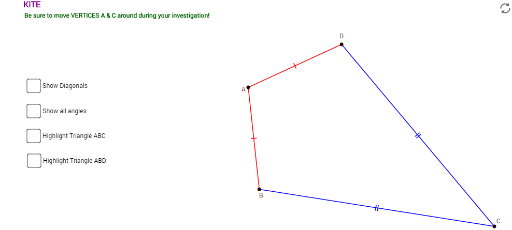
① This example presents a dynamic kite-shaped geometric template built in GeoGebra, demonstrating a symmetric quadrilateral with auxiliary lines, angles, and polygon regions. ② Core mathematical concepts include the definition of a kite (two pairs of adjacent equal sides), intersections of lines and circles, angle measurement, polygon area, and the visualization of definite integrals, with potential connections to complex numbers and sine functions. ③ Construction details: uses Circle, Intersect, Segment, Angle, and Polygon commands; objects include points A, B, C, D and auxiliary points, segments a, b, d, e, f, angles α, β, γ, δ, polygons poly1 and poly2, and text labels text1 and text2. ④ Suitable for middle school geometry, high school analytic geometry, or introductory calculus, this template helps explore kite properties, area computation, and integral concepts interactively, and can be adapted by teachers for dynamic demonstrations.
GeoGebra Commands & Parameters
Circle(A, B_1) → cCircle(C, D_1) → dIntersect(c, d, 1) → DIntersect(c, d, 2) → BSegment(D, C) → aSegment(C, B) → bSegment(D, A) → eSegment(A, B) → fSegment(D, B) → hSegment(A, C) → iAngle(B, A, D) → αAngle(A, D, C) → βAngle(D, C, B) → γAngle(C, B, A) → δPolygon(A, B, C) → poly1, c_1, a_1, b_1Polygon(A, B, D) → poly2, d_1, a_2, b_2
AI Drawing Prompt Reference
Create a dynamic kite-shaped geometric template: start with two intersecting circles, take their two intersection points as the upper and lower vertices of the kite, and place two points on each circle as the left and right vertices. Connect the four vertices to form the kite shape. Draw the diagonals and label the four interior angles. Fill the kite interior with two triangular regions to represent polygon areas. The overall figure shows a symmetric quadrilateral with auxiliary circles, segments, angles, and area regions, suitable for geometry and integral visualization.
The prompt above was compiled from the original drawing commands and is for reference only.