
Blaise Carson - Rhombus Construction
Loading the math board and drawing, please wait…
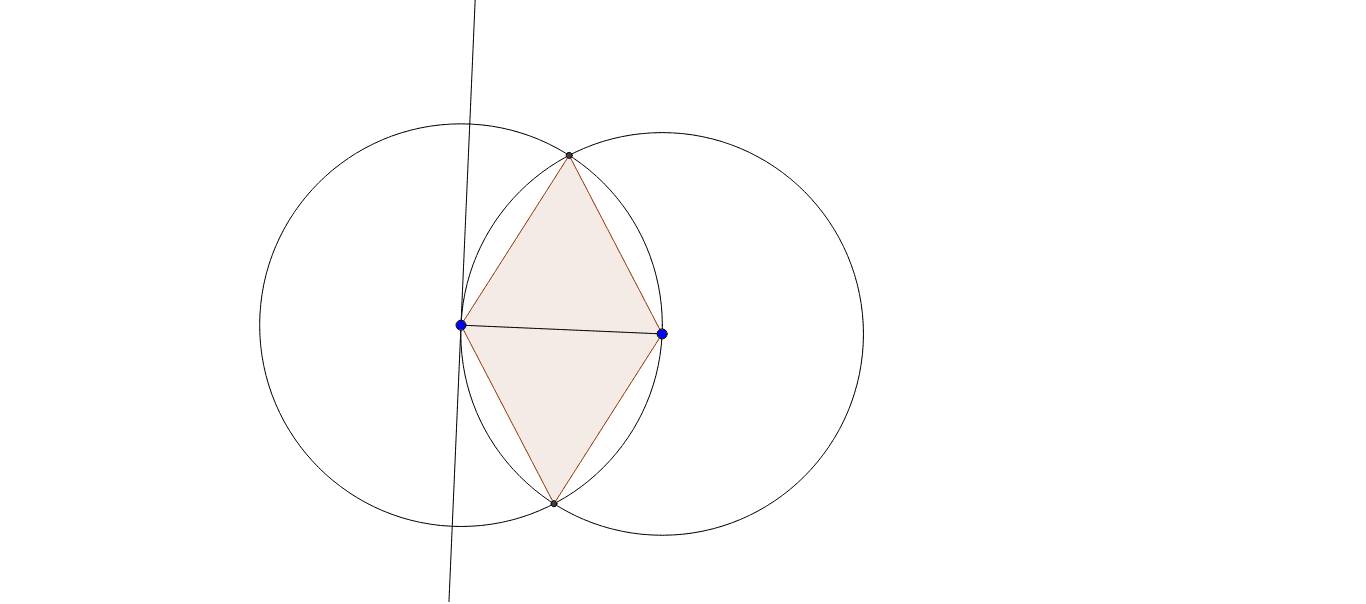
① This example demonstrates how to construct a rhombus using geometric construction techniques, and shows its relationship to trapezoids and squares. ② Core mathematical concepts include the definition of a rhombus (all sides equal), properties of perpendicular lines, using circle intersections to determine equidistant points, and potential connections to polygon area and integral calculus. ③ Construction highlights: from the construction summary, GeoGebra commands such as Segment, OrthogonalLine, Circle, Intersect, and Polygon are used, creating objects A, B, a, b, c, d, C, D, poly1, and auxiliary objects c_1, a_1, d_1, b_1. The vertices of the rhombus are determined via intersections of perpendicular lines and circles. ④ Suitable for middle/high school geometry teaching, dynamic geometry exploration, and as an intuitive introduction to area concepts in calculus. It is also useful for teachers demonstrating rigorous geometric construction steps.
GeoGebra Commands & Parameters
Segment(A, B) → aOrthogonalLine(A, a) → bCircle(A, Segment[A, B]) → cCircle(B, Segment[B, A]) → dIntersect(c, d, 1) → CIntersect(c, d, 2) → DPolygon(C, A, D, B) → poly1, c_1, a_1, d_1, b_1
AI Drawing Prompt Reference
Start with a horizontal segment and label its endpoints. Construct a perpendicular line through one endpoint. Draw two circles centered at each endpoint with radius equal to the segment length; they intersect at two points above and below. Connect the two endpoints and the two intersection points to form a quadrilateral. All four sides equal the original segment, making it a rhombus. Observe that its diagonals are perpendicular, and relate it to trapezoids and squares.
The prompt above was compiled from the original drawing commands and is for reference only.