
Kite Properties Exploration by Nick Davis-Poynter
Loading the math board and drawing, please wait…
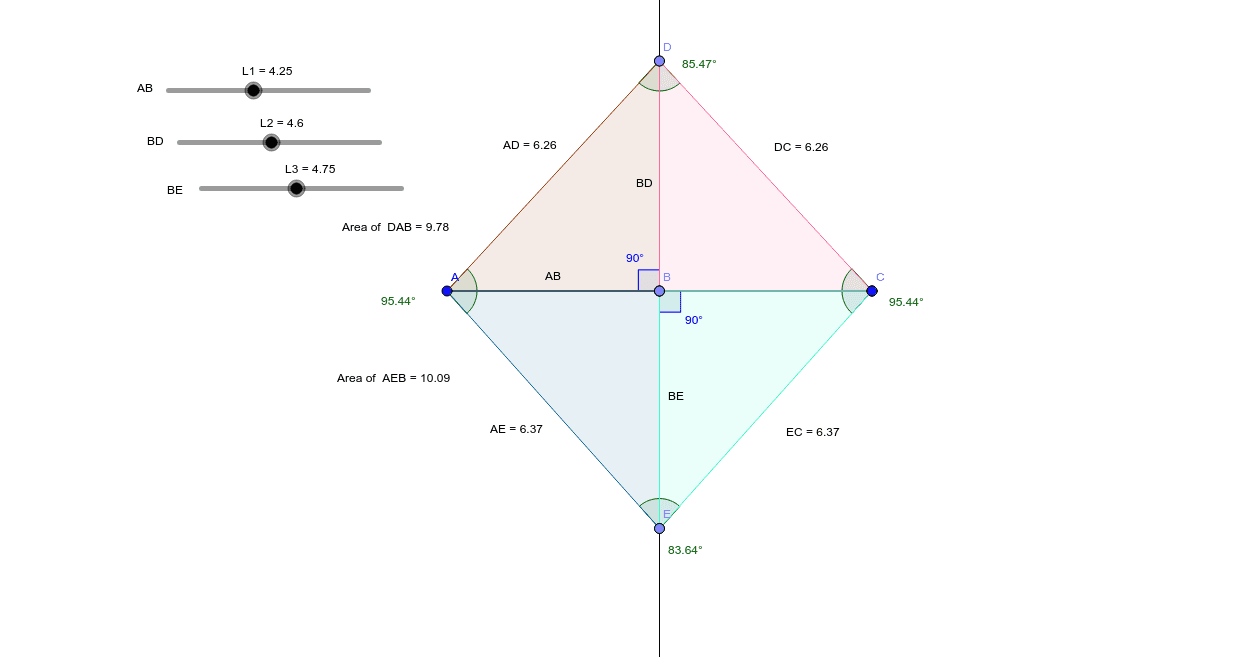
This GeoGebra interactive model uses slider bars to dynamically adjust internal lengths L1, L2, and L3, allowing users to explore the geometric properties of kites. Key mathematical concepts include quadrilateral properties, diagonal relationships, area calculation, and parameter-dependent shape transformation. The construction employs GeoGebra commands such as Point, Segment, OrthogonalLine, Angle, Polygon, Mirror, Distance, Midpoint, and PointIn, with dynamic object binding enabling interactive parameter control. Suitable for middle to high school geometry education, it supports autonomous exploration of kite properties and parameterized geometry discussions.
GeoGebra Commands & Parameters
Point(Circle[A, L1]) → BSegment(A, B) → ABPoint(Circle[B, L1]) → CSegment(B, C) → gOrthogonalLine(B, AB) → hPoint(Circle[B, L2]) → DSegment(B, D) → BDPoint(Circle[B, L3]) → ESegment(B, E) → BEAngle(E, A, D) → αAngle(D, C, E) → βAngle(A, D, C) → γAngle(C, E, A) → δAngle(D, B, A) → εPolygon(D, A, B) → poly1, b, d, aMirror(D, h) → D'Mirror(A, h) → A'Mirror(B, h) → B'Polygon(D', A', B') → poly1', b', d', a'Polygon(A, E, B) → poly2, b_1, a_1, eMirror(A, h) → A'_1Mirror(E, h) → E'Mirror(B, h) → B'_1Polygon(A'_1, E', B'_1) → poly2', b'_1, a'_1, e'Distance(A, D) → distanceADMidpoint(A, D) →Distance(D, C) → distanceDCMidpoint(D, C) →Distance(A, E) → distanceAEMidpoint(A, E) →Distance(E, C) → distanceECMidpoint(E, C) →PointIn(poly1) → Pointpoly1PointIn(poly2) → Pointpoly2Angle(E, B, C) → ζ
AI Drawing Prompt Reference
Draw a kite-shaped quadrilateral controlled by three sliders. Start with a fixed vertex and use three different radii to place three moving points, connecting them to form two adjacent sides. Construct a perpendicular line through the fixed vertex as an axis of symmetry, then mirror one triangle across it to complete the kite. Inside, form another triangle with a fourth moving point and mirror it similarly. Label all vertex angles, mark midpoints of sides and their connecting segments, and place a movable point inside each polygon. The entire figure adjusts dynamically with the sliders to explore kite properties.
The prompt above was compiled from the original drawing commands and is for reference only.