
Kite Perimeter and Rotation Demo
Loading the math board and drawing, please wait…
In collections
CCSS Support Math I Unit 6
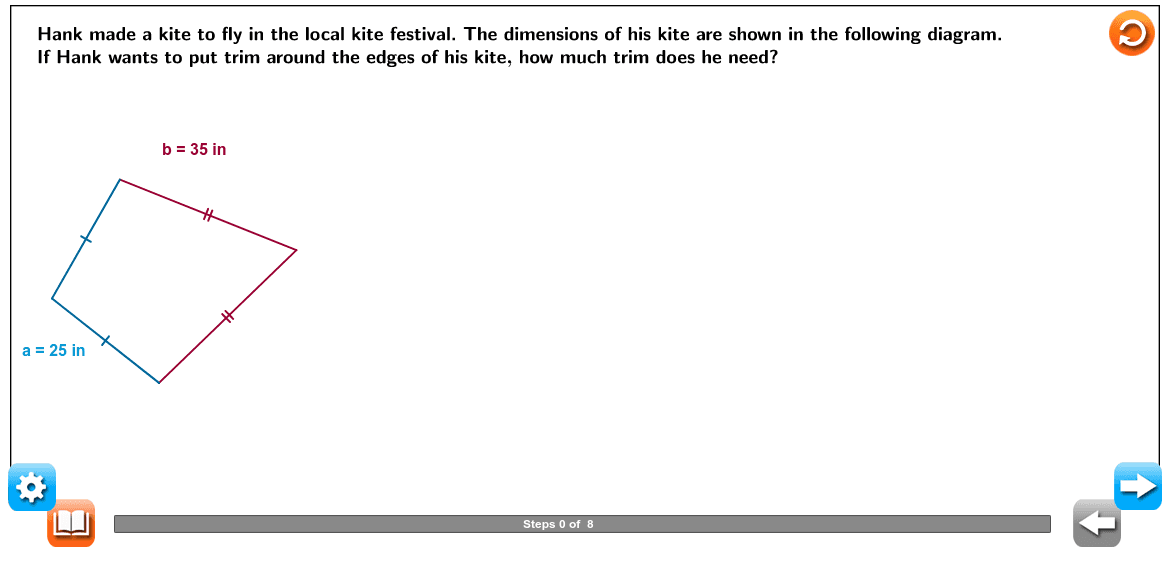
① This example demonstrates the geometric construction of a kite (convex quadrilateral), the calculation of its perimeter, and a dynamic rotation about a fixed point. ② Core mathematical concepts include kite properties, perimeter formula, vector representation, rotation transformations, and sequence/slider‑driven animation. ③ Construction highlights: Circle, Point, Segment, and Intersect create vertices and edges; Vector defines edge vectors; Sequence together with Slider1 and Slider2 controls the rotation angle and generates the animated trace; LaTeX labels dimensions and formulas; UI objects such as Progressbar and Hint support interactive teaching. ④ Suitable for middle‑school geometry (quadrilaterals, perimeter), high‑school vectors and transformations, and as a GeoGebra geometric construction and slider animation teaching resource.
GeoGebra Commands & Parameters
Circle(C, Slider1) → cPoint(c) → DSegment((0, 0), (0, 1)) → iSegment(A_0, B_0) → ScalelineSequence(Segment[A_0 + (i, 0), A_0 + (i, (-0.5))], i, 0, 10) → list1Sequence(Segment[A_0 + (i - 0.5, 0), A_0 + (i - 0.5, (-0.4))], i, 1, 10) → list2Sequence(Sequence[Segment[A_0 + ((0.5 * i) + (0.1 * j), 0), A_0 + ((0.5 * i) + (0.1 * j), (-0.3))], j, 1, 4], i, 0, 19) → list3Segment(D_0, (x(D_0), 0)) → jVector(C_0, D_0) → uLaTeX("\text{Hank made a kite to fly in the local kite festival. The dimensions of his kite are shown in the following diagram.}") → text1LaTeX("\text{If Hank wants to put trim around the edges of his kite, how much trim does he need?}") → text2LaTeX("\text{Determine the length of each side.}") → text3LaTeX("\text{Find the perimeter.}") → text6LaTeX("\text{To find the perimeter, add the lengths of all the sides.}") → text7LaTeX("\text{Write an equation.}") → text9LaTeX("\text{Simplify.}") → text11Segment(C, D) → bPoint(c) → ESegment(C, E) → dCircle(D, Slider2) → eCircle(E, Slider2) → fIntersect(e, f, 1) → FSegment(D, F) → gSegment(F, E) → lLaTeX("\text{0}") → Scalevalue0LaTeX("\text{10}") → Scalevalue1LaTeX("\text{20}") → Scalevalue2LaTeX("\text{30}") → Scalevalue3LaTeX("\text{40}") → Scalevalue4LaTeX("\text{50}") → Scalevalue5LaTeX("\text{60}") → Scalevalue6LaTeX("\text{70}") → Scalevalue7LaTeX("\text{80}") → Scalevalue8LaTeX("\text{90}") → Scalevalue9LaTeX("\text{100}") → Scalevalue10Segment(G, H) → hVector(H, P1) → vSegment(P1, (x(P1), 0)) → kLaTeX((("\text{The sides marked with one tick mark are both \textcolor{#000099}{" * v1) * "} inches long.}")) → text4LaTeX((("\text{The sides marked with two tick marks are both \textcolor{#000099}{" * v2) * "} inches long.}")) → text5LaTeX((((((((("\text{\textcolor{#000099}{P = " * v1) * "+") * v1) * "+") * v2) * "+") * v2) * "}}")) → text8LaTeX((("\text{\textcolor{#000099}{P = " * sol) * "}}")) → text10LaTeX("\text{of trim.}") → text12_1LaTeX((((("\text{The perimeter of the kite is \textcolor{#000099}{" * sol) * "} inches; therefore, Hank will need \textcolor{#000099}{") * sol) * "} inches }")) → text12LaTeX("\text{\mathbf{Perimeter} the distance around a two-dimensional figure.}") → text13LaTeX("\text{\mathbf{Line\; segment} a part of a line that is noted by two endpoints,(x ,y ) and (x ,y ). }") → text14
AI Drawing Prompt Reference
Draw a kite diagram, a convex quadrilateral with two equal symmetric sides. Include a fixed rotation center, one vertex rotating around it, and a slider controlling the rotation angle, with the rotation trajectory drawn as line segments. Connect the four kite vertices and edges with line segments. The construction order should be: first establish the initial kite shape and rotation center, then add the slider to control rotation angle, and finally draw the rotation trajectory. The diagram should clearly show the kite's geometric structure, rotation transformation, and dynamic animation.
The prompt above was compiled from the original drawing commands and is for reference only.