
Kite Exploration: Dynamic Quadrilateral Construction with Angle Bisectors
Loading the math board and drawing, please wait…
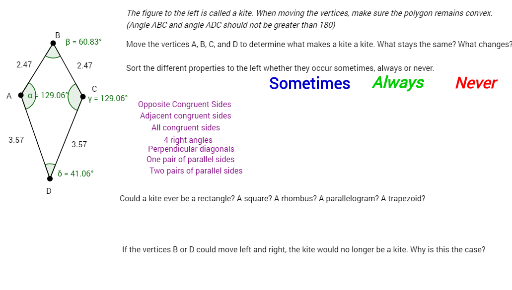
This GeoGebra example demonstrates the dynamic construction and exploration of a kite, a special quadrilateral defined by two pairs of equal-length adjacent sides. Users can drag vertices to observe how diagonals, angle bisectors, and interior angles change in real time. The core mathematical concepts covered include properties of special quadrilaterals, kite symmetry, angle bisector theorems, segment-point relationships, and polygonal angle measures. Construction is based on GeoGebra commands Segment, LineBisector, Point, and Angle, employing point objects A, C, B, D, line objects f through k, angle labels α, β, γ, δ, and multiple text annotations text1 through text13 to support guided observation. Suitable for middle school and high school geometry instruction, this resource is ideal for inquiry-based learning of kite symmetry and perpendicular diagonals, as well as hands-on practice with geometric construction tools.
GeoGebra Commands & Parameters
Segment(A, C) → fLineBisector(f) → gPoint(g) → BPoint(g) → DSegment(A, D) → hSegment(D, C) → iSegment(C, B) → jSegment(B, A) → kAngle(D, A, B) → αAngle(A, B, C) → βAngle(B, C, D) → γAngle(C, D, A) → δ
AI Drawing Prompt Reference
Please draw a kite-shaped quadrilateral, which is defined by two pairs of adjacent equal-length sides. First, construct a line segment, then find the angle bisector of this segment and mark two points on it as the other two vertices. Next, connect all vertices to form the quadrilateral and label each interior angle's measure. Users can drag the vertices to observe changes in diagonals, angle bisectors, and interior angles.
The prompt above was compiled from the original drawing commands and is for reference only.