
Kite Area by Beverly Heigre
Loading the math board and drawing, please wait…
In collections
Area Formulas
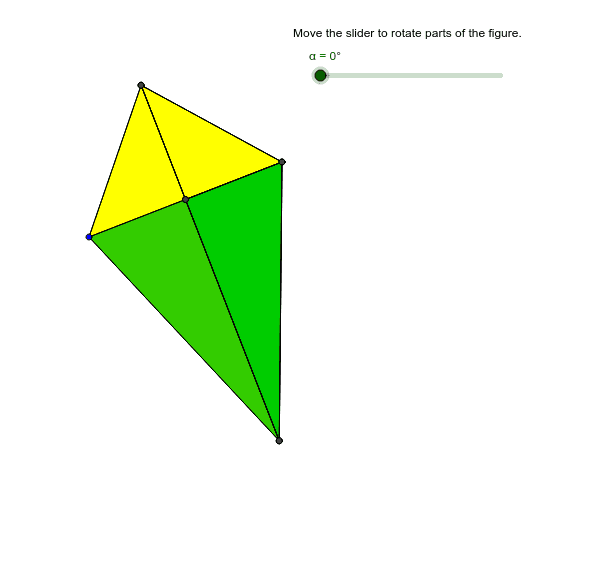
This example provides an interactive visualization to help understand the formula for calculating the area of a kite. Key mathematical concepts include the properties and area formula of a kite. It uses commands such as Midpoint, Segment, OrthogonalLine, Point, Polygon, and Rotate in GeoGebra. Suitable for students in middle school and above for geometric construction and area calculation.
GeoGebra Commands & Parameters
Midpoint(A, B) → CSegment(A, B) → aOrthogonalLine(C, a) → bPoint(b) → DSegment(B, D) → eMidpoint(e) → JPoint(b) → ESegment(D, E) → cSegment(A, D) → dSegment(B, E) → fSegment(A, E) → gPolygon(D, C, B) → poly1, b_1, d_1, c_1Polygon(C, B, E) → poly2, e_1, c_2, b_2Midpoint(f) → IRotate(D, α, J) → D'_1Rotate(C, α, J) → C'Rotate(B, α, J) → B'Polygon(D'_1, C', B') → poly1', b', d'_1, c'Rotate(C, α, I) → C'_1Rotate(B, α, I) → B'_1Rotate(E, α, I) → E'_1Polygon(C'_1, B'_1, E'_1) → poly2', e'_1, c'_1, b'_1Polygon(A, D, C) → poly3, c_3, a_1, d_2Polygon(A, C, E) → poly4, e_2, a_2, c_4Rotate(D, α, D) → D'Rotate(E, α, E) → E'
AI Drawing Prompt Reference
Draw a kite and illustrate the process of calculating its area. Start by constructing the two diagonals of the kite, identifying their intersection point and the midpoints of each side. Connect these midpoints to form a smaller triangle. Use rotation and symmetry to demonstrate the derivation of the area formula. The final image should include the kite's outline, diagonals, midpoints connected, and rotated auxiliary shapes, clearly showing the geometric basis of the area formula.
The prompt above was compiled from the original drawing commands and is for reference only.