
Kite Activity.1
Loading the math board and drawing, please wait…
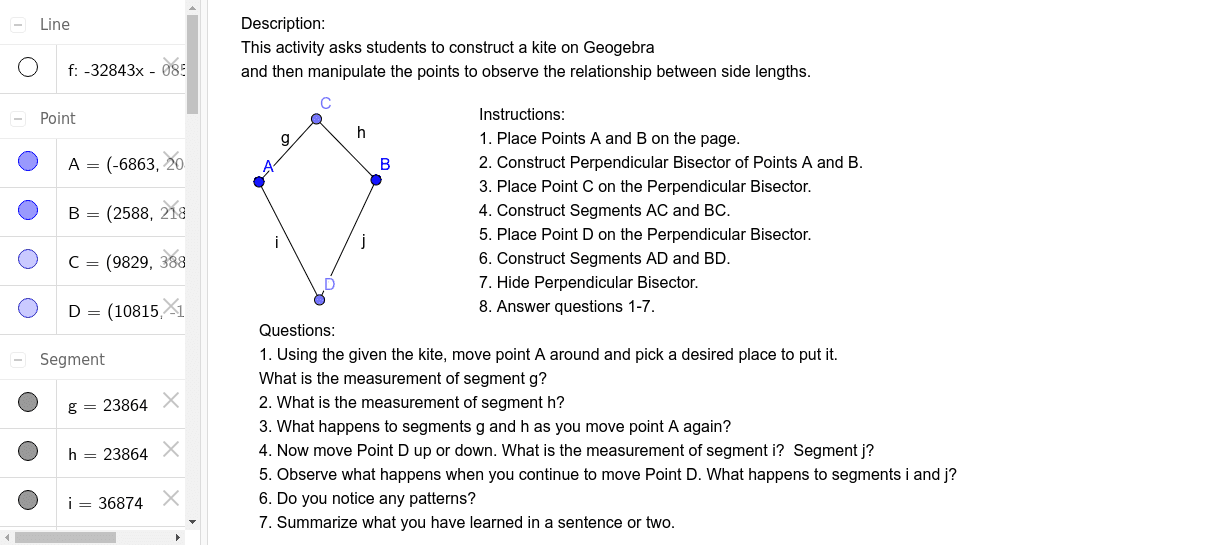
This example demonstrates the construction and properties of a kite shape, involving core math concepts like polygons, functions, random experiments, conditional probability, division, and trigonometry. Key GeoGebra commands used include LineBisector, Point, and Segment for geometric construction. Suitable for high school mathematics teaching, focusing on geometric drawing and introductory probability statistics applications.
GeoGebra Commands & Parameters
LineBisector(A, B) → fPoint(f) → CSegment(A, C) → gSegment(B, C) → hPoint(f) → DSegment(A, D) → iSegment(D, B) → j
AI Drawing Prompt Reference
Draw a kite-shaped quadrilateral. Start with a line segment as the axis of symmetry. Place one point on the axis as a vertex, and another point on the axis as the opposite vertex. Then add two points off the axis, one on each side, and connect each of these off-axis points to both on-axis vertices with straight segments, forming four sides. The shape should be symmetric about the axis, with two pairs of adjacent equal sides, resembling a classic kite.
The prompt above was compiled from the original drawing commands and is for reference only.