
Jurriaan Schrofer Rectangle/Circle Construction
Loading the math board and drawing, please wait…
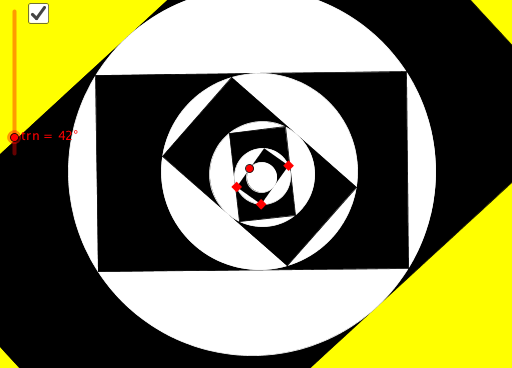
This example demonstrates the geometric construction of a rectangle and circle design by Jurriaan Schrofer, involving core concepts like circles, rectangles, rotations, translations, matrix transformations, and coordinate geometry. It utilizes GeoGebra commands such as Line, OrthogonalLine, Point, Min, Circle, Intersect, Rotate, Translate, Polygon, and Vertex. Suitable for high school and above students to explore geometric transformations and coordinate geometry applications.
GeoGebra Commands & Parameters
Line(A, B) → fOrthogonalLine(B, f) → gPoint(g) → CPoint(Segment[A, D]) → EMin({Distance[E, A], Distance[E, E + B - A] / 2, Distance[E, D]}) → aCircle(E + ((a * (B - A))) / Distance[A, B], a) → cCircle(D, A, B) → dIntersect(d, Ray[G, G + D - C]) → H,Rotate(Dilate[E, aspect, G], trn, G) → IRotate(H, trn, G) → H'Rotate(Polygon[Dilate[A, aspect, G], Dilate[B, aspect, G], Dilate[C, aspect, G], Dilate[D, aspect, G]], trn, G) → poly2Translate(poly2, Vector[I, H']) → poly2'Polygon(A, B, C, D) → poly1, a_1, b, c_1, d_1Vertex(poly2') → J, K, L, Mnxtlvl(J, K, L, H', trn) → F, N, O, poly3, P, enxtlvl(F, N, O, P, trn) → Q, R, S, poly4, T, hnxtlvl(Q, R, S, T, trn) → U, V, W, poly5, Z, k
AI Drawing Prompt Reference
Draw a geometric design featuring a rectangle and circle, demonstrating core concepts like circles, rectangles, rotations, translations, matrix transformations, and coordinate geometry. Start by drawing a line segment, then a perpendicular line. Find the midpoint of the segment and draw a circle. Next, draw another circle with the midpoint as the center and the distance from the midpoint to one endpoint as the radius. Intersect the first circle with a ray to get point H, then rotate and translate parts of the figure around a point to create a complex geometric pattern.
The prompt above was compiled from the original drawing commands and is for reference only.