
Isosceles Triangles - Examples and Non-Examples (Interactive Construction)
Loading the math board and drawing, please wait…
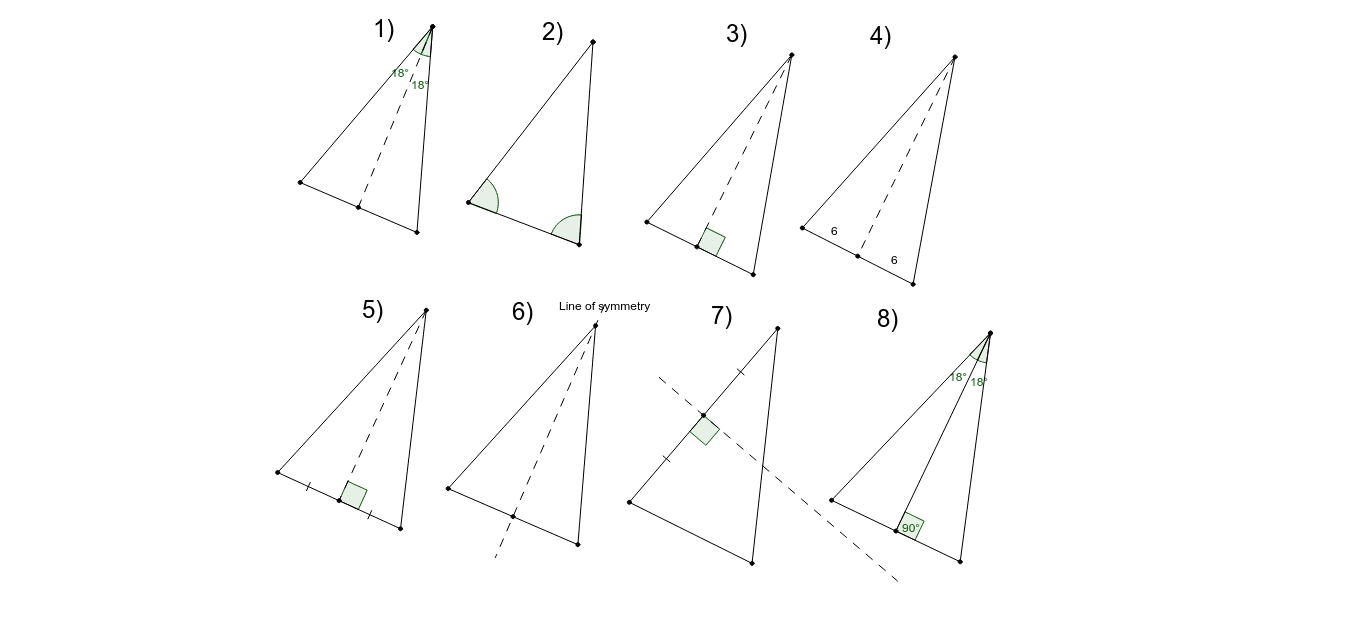
① This interactive GeoGebra example demonstrates the defining properties of isosceles triangles and contrasts them with non-examples, helping learners visually identify the key conditions. ② Core mathematical concepts include the definition of an isosceles triangle (two equal sides), equal base angles, the axis of symmetry (perpendicular bisector), and the coincidence of angle bisector, median, and altitude. ③ Construction highlights: using GeoGebra commands such as Rotate, Angle, Segment, Point, Ray, AngularBisector, Intersect, Mirror, OrthogonalLine, Midpoint, and Circle, the example builds a dynamic triangle with auxiliary lines, allowing users to drag vertices and observe changes in side lengths and angles to distinguish isosceles from non-isosceles cases. ④ Suitable for middle school geometry lessons or self-study, this resource aids in understanding the definition and properties of isosceles triangles and can serve as a template for teachers creating interactive materials.
GeoGebra Commands & Parameters
Rotate(A, 36*°, B) → A'Angle(A, B, A') → αSegment(C, D) → aRotate(C, α, D) → C'Rotate(D, α, D) → D'Segment(C', D') → a'Point(a') → ERay(D, E) → bPoint(b) → FSegment(C, F) → cAngularBisector(C, D, F) → dIntersect(d, c) → GSegment(D, G) → eSegment(D, F) → fAngle(C, D, G) → βAngle(G, D, F) → γSegment(H, I) → gSegment(H, J) → hMirror(H, g) → H'Mirror(J, g) → J'Segment(H', J') → h'Segment(J, J') → iAngle(J', J, H) → δAngle(H, J', J) → εSegment(K, L) → jSegment(L, M) → kSegment(M, K) → lOrthogonalLine(L, l) → mIntersect(m, l) → NSegment(L, N) → nAngle(M, N, L) → ζPoint(Circle[O, 2.5]) → PSegment(O, P) → pMidpoint(O, P) → QSegment(O, R) → qSegment(R, P) → rSegment(R, Q) → sSegment(S, T) → tMidpoint(S, T) → UOrthogonalLine(U, t) → a_1Point(a_1) → VSegment(S, V) → b_1Segment(V, T) → c_1Segment(V, U) → d_1Segment(W, Z) → e_1Midpoint(e_1) → A_1OrthogonalLine(A_1, e_1) → f_1Point(f_1) → B_1Segment(W, B_1) → g_1Segment(B_1, Z) → h_1Point(f_1) → C_1Point(f_1) → D_1Segment(C_1, D_1) → i_1Segment(E_1, F_1) → j_1Circle(G_1, 0.3) → k_1Midpoint(S, U) → H_1Point(k_1) → J_1Segment(G_1, J_1) → l_1Circle(H_1, l_1) → p_1OrthogonalLine(H_1, t) → m_1Intersect(p_1, m_1, 2) → K_1Intersect(p_1, m_1, 1) → L_1Segment(S, U) → q_1Segment(U, T) → r_1Midpoint(F_1, E_1) → I_1OrthogonalLine(I_1, j_1) → n_1Segment(F_1, I_1) → s_1Segment(I_1, E_1) → t_1Segment(E_1, M_1) → a_2Segment(M_1, F_1) → b_2Point(n_1) → N_1Point(n_1) → O_1Segment(N_1, O_1) → c_2Angle(F_1, I_1, O_1) → ηRotate(A_2, 36*°, B_2) → A'_1Angle(A_2, B_2, A'_1) → α_1Segment(C_2, D_2) → a_3Rotate(C_2, α_1, D_2) → C'_1Rotate(D_2, α_1, D_2) → D'_1Segment(C'_1, D'_1) → a'_1Point(a'_1) → E_2Ray(D_2, E_2) → b_3Point(b_3) → F_2Segment(C_2, F_2) → c_3AngularBisector(C_2, D_2, F_2) → d_2Intersect(d_2, c_3) → G_2Segment(D_2, G_2) → e_2Segment(D_2, F_2) → f_2Angle(C_2, D_2, G_2) → β_1Angle(G_2, D_2, F_2) → γ_1OrthogonalLine(C_2, e_2) → g_2Intersect(g_2, f_2) → P_1Segment(D_2, P_1) → h_2Midpoint(C_2, P_1) → Q_1Segment(C_2, P_1) → i_2Segment(Q_1, D_2) → j_2Angle(P_1, Q_1, D_2) → θAngle(T, U, V) → ι
AI Drawing Prompt Reference
Draw a geometric diagram with multiple triangles. First, construct an isosceles triangle by rotating one point around a vertex, marking the vertex angle and showing two equal sides. Then, extend a ray from the base, pick a point on it, form another triangle, and draw its angle bisector intersecting the opposite side, creating two adjacent angles. Next, draw a segment as an axis of symmetry, reflect two points across it, connect the reflected points, and mark the resulting angles. Then, draw an arbitrary triangle, construct a perpendicular from one vertex to the opposite side, mark the foot and angle. Finally, draw a circle, take a point on it, connect to the center, find the midpoint, draw several segments to form a triangle, and construct the perpendicular bisector of one side, picking a point on it to form a new triangle. The whole figure illustrates properties of isosceles triangles.
The prompt above was compiled from the original drawing commands and is for reference only.