
Isosceles Trapezoid Template
Loading the math board and drawing, please wait…
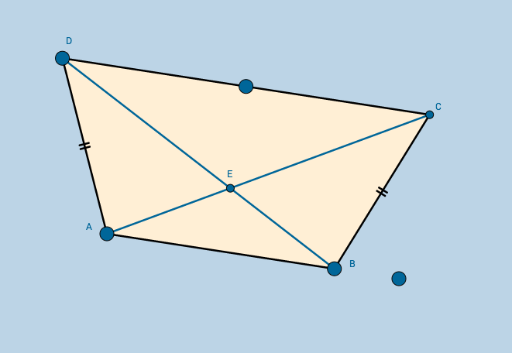
This example demonstrates the geometric construction and properties of an isosceles trapezoid. It involves core mathematical concepts such as polygons, vectors, coordinate geometry, and geometric construction. The construction utilizes GeoGebra commands and objects like Line, Point, Midpoint, Slope, OrthogonalLine, Mirror, Dilate, Segment, Circle, Intersect, Vector, Translate, Angle, Rotate, Polygon, and Distance. It is suitable for high school mathematics education to understand the symmetry and related calculations of isosceles trapezoids.
GeoGebra Commands & Parameters
Line(A, B_1) → aRay(A, B_1) → bPoint(b) → BMidpoint(A, B) → D_1Line(A, B) → cSlope(c) → dOrthogonalLine(D_1, c) → gPoint(g) → E_1Ray(D_1, E_1) → hPoint(h) → FSlope(h) → iLine(F, c) → lPoint(l) → GPoint(l) → HRay(F, G) → mRay(F, H) → nPoint(m) → DMirror(D, h) → I'Dilate(A, If[0 < o ≤ 1, 1 - o, 0], B) → A'Segment(A, A') → pDilate(A, If[1 < o ≤ 2, 2 - o, 0], D) → A'_1Segment(A, A'_1) → qSegment(A, B) → rSegment(B, I') → sSegment(I', D) → tSegment(D, A) → a_1Circle(A, (0.2 * Min[a_1, r])) → c_1Circle(D, (0.2 * Min[a_1, r])) → d_1Intersect(d_1, a_1, 1) → JIntersect(d_1, t, 1) → KIntersect(c_1, r, 1) → LIntersect(c_1, a_1, 1) → MDilate(D, If[2 < o ≤ 3, 3 - o, 0], I') → CSegment(D, C) → b_1Dilate(A, If[3 < o ≤ 4, 4 - o, 0], B) → A'_2Vector(A, A'_2) → uTranslate(A, u) → A'_3Translate(A'_1, u) → NSegment(A'_3, N) → q'OrthogonalLine(A, r) → g_1Point(g_1) → OAngle(D, A, O) → αAngle(I', B, A) → βRotate(A'_3, If[4 < o ≤ 5, (((o - 4) * 2) * α), (2 * α)], B) → PRotate(N, If[4 < o ≤ 5, (((o - 4) * 2) * α), (2 * α)], B) → C_1Dilate(A, If[5 < o ≤ 6, 6 - o, 0], B) → A'_4Vector(A, A'_4) → vDilate(D, If[7 < o ≤ 8, 8 - o, 0], I') → I'_2Vector(D, I'_2) → wDilate(A, If[9 < o ≤ 10, 10 - o, 0], I') → A'_5Segment(A, A'_5) → i_1Dilate(A, If[10 < o ≤ 11, 11 - o, 0], D) → A'_6Vector(A, A'_6) → u_1Translate(A, u_1) → A'_7Translate(A'_5, u_1) → QSegment(A'_7, Q) → j_1Segment(D, B) → l_1Angle(L, A, I') → γRotate(A'_7, If[11 < o ≤ 12, ((-(o - 11)) * (2 * γ)), (-2 * γ)], D) → RRotate(Q, If[11 < o ≤ 12, ((-(o - 11)) * (2 * γ)), (-2 * γ)], D) → Q'Segment(R, Q') → m_1Polygon(A, B, I', D) → poly1, a_2, c_2, i', i_2Intersect(i_1, m_1) → EDistance(A, E) → distanceASDistance(E, C_1) → distanceSN'Distance(E, B) → distanceSCDistance(E, D) → distanceSISegment(B, I') → q''
AI Drawing Prompt Reference
Draw an isosceles trapezoid. Start with a horizontal base line and a ray from one endpoint; pick a point on the ray as the top-left vertex. Connect the base endpoints to form the lower base. Find the midpoint of the base and draw a perpendicular line as the axis of symmetry. On this axis, choose a point and draw a line parallel to the base to define the top side. Reflect the top-left vertex across the axis to get the top-right vertex. Then, using scaling and translation, adjust the shape to form the complete trapezoid. Add small circles at the vertices to mark equal angles or sides, and draw segments connecting all vertices. Finally, label the angles to show the symmetry properties of the isosceles trapezoid.
The prompt above was compiled from the original drawing commands and is for reference only.