
Isosceles Trapezoid Construction by tammacooper
Loading the math board and drawing, please wait…
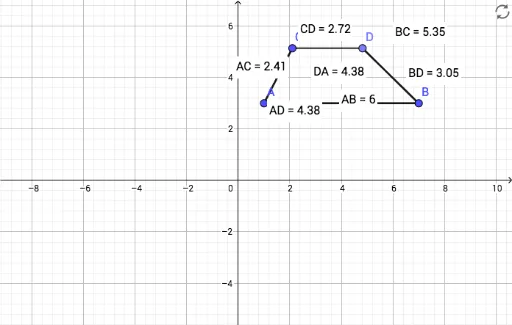
This example demonstrates how to construct an isosceles trapezoid using GeoGebra. Key mathematical concepts include the properties of an isosceles trapezoid and construction methods. Using commands like Segment, Line, Point, and Distance, the trapezoid is constructed and its side lengths are measured. Suitable for middle school and above students or teachers.
GeoGebra Commands & Parameters
Segment(A, B) → fLine(C, f) → gSegment(A, C) → hPoint(g) → DSegment(B, D) → iSegment(C, D) → jSegment(D, B) → kSegment(A, B) → lSegment(A, C) → mDistance(C, D) → distanceCDDistance(B, D) → distanceBDDistance(A, C) → distanceACDistance(A, B) → distanceABDistance(B, C) → distanceBCDistance(A, D) → distanceADDistance(D, A) → distanceDA
AI Drawing Prompt Reference
Draw an isosceles trapezoid by first drawing two parallel line segments AB and CD, then taking points A and B on AB and points C and D on CD, ensuring that AD and BC have the same length, and finally connecting points A and B, B and D, C and D, and D and A, measuring the lengths of each side.
The prompt above was compiled from the original drawing commands and is for reference only.