
Isosceles Trapezoid by 680353
Loading the math board and drawing, please wait…
In collections
Quadrilaterals Constructions
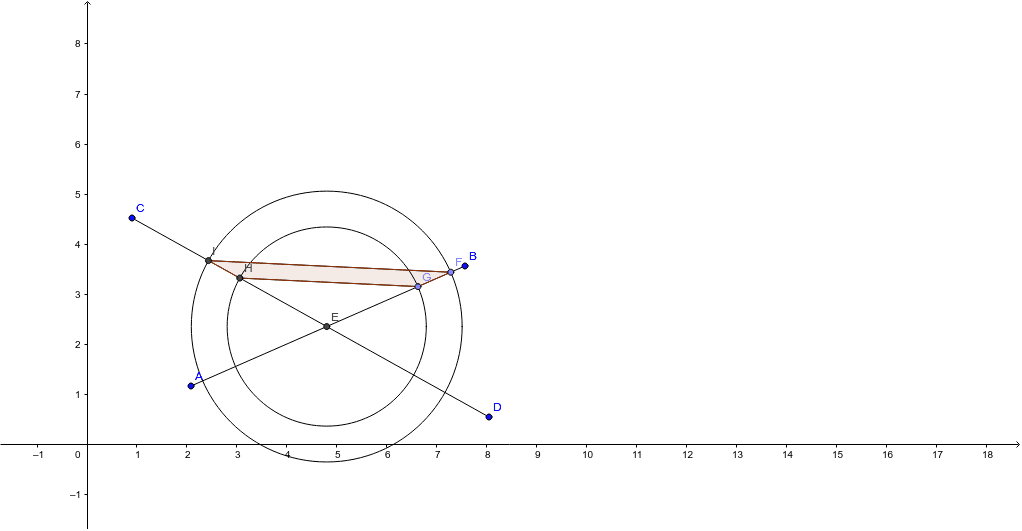
The isosceles trapezoid is a special type of trapezoid with equal legs and equal base angles. This example demonstrates its construction using GeoGebra commands such as Segment, Intersect, and Circle. Key steps include defining the base, legs, and top edge to verify symmetry. Suitable for middle school geometry education to understand trapezoid properties and construction techniques.
GeoGebra Commands & Parameters
Segment(A, B) → aSegment(C, D) → bIntersect(a, b) → EPoint(a) → FCircle(E, F) → cPoint(a) → GCircle(E, G) → dIntersect(d, b, 1) → HIntersect(c, b, 1) → ISegment(H, G) → eSegment(I, F) → fPolygon(I, H, G, F) → poly1, i, h, g, f_1
AI Drawing Prompt Reference
Draw an isosceles trapezoid. First, draw the bottom base. Then, draw two equal legs that form equal angles with the base. Next, draw a top base parallel to the bottom base to ensure symmetry. Finally, connect the top and bottom bases to form the complete isosceles trapezoid.
The prompt above was compiled from the original drawing commands and is for reference only.