
Rhombus Construction by 680353
Loading the math board and drawing, please wait…
In collections
Quadrilaterals Constructions
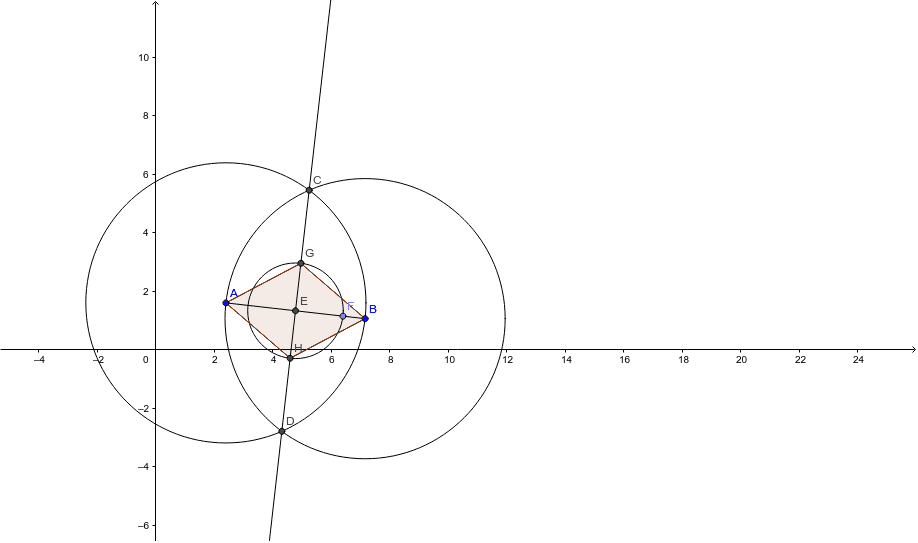
This example demonstrates the construction of a rhombus. Key mathematical concepts include vectors and geometric construction. Using GeoGebra commands such as Segment, Circle, Intersect, Line, Point, and Polygon, a rhombus can be constructed. Suitable for students at the junior high school level and above to learn about the properties of rhombuses and geometric construction.
GeoGebra Commands & Parameters
Segment(A, B) → aCircle(A, B) → cCircle(B, A) → dIntersect(c, d, 1) → CIntersect(c, d, 2) → DLine(C, D) → bIntersect(b, a) → EPoint(a) → FCircle(E, F) → eIntersect(e, b, 1) → GIntersect(e, b, 2) → HSegment(A, H) → fSegment(H, B) → gSegment(B, G) → hSegment(G, A) → iPolygon(A, H, B, G) → poly1, a_1, h_1, b_1, g_1
AI Drawing Prompt Reference
Draw a rhombus by first creating a line segment between points A and B, then drawing two circles with A and B as centers, finding their intersection points C and D, connecting C and D to form a line, this line intersects the segment AB at point E, then drawing two more circles with E and the other endpoint of AB as centers, finding their intersections with line CD at points G and H, connecting A to H, H to B, B to G, and G to A to form a quadrilateral.
The prompt above was compiled from the original drawing commands and is for reference only.