
Irregular Mosaic
Loading the math board and drawing, please wait…
In collections
geometriadinamica.es
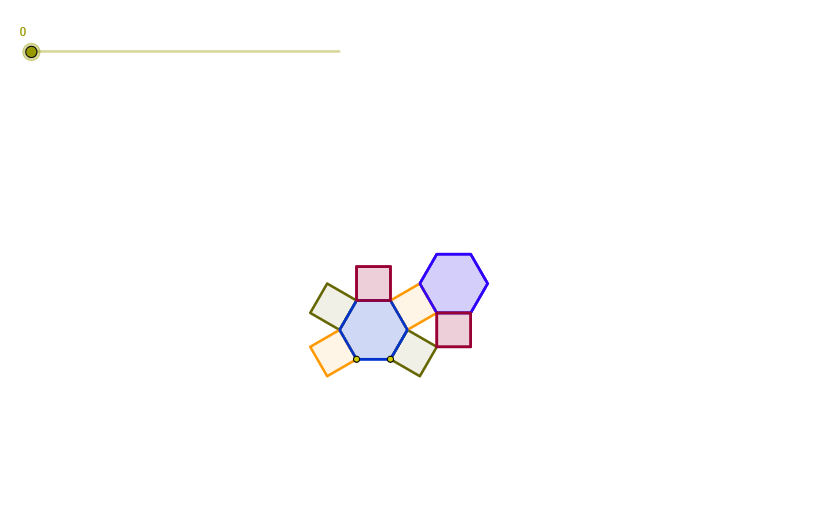
This example demonstrates the construction of an irregular mosaic. Key mathematical concepts include transformations (such as homothety) and geometric construction. Using GeoGebra objects like vectors, circles, and lines, an irregular mosaic can be constructed. Suitable for middle school and above students or teachers for teaching geometric construction and transformations.
GeoGebra Commands & Parameters
Vector(A, B) → uCircle(B, A) → c2Circle(A, B) → c1Intersect(c1, c2, 1) → C1Circle(C1, A) → c3Intersect(c2, c3, 2) → P2Circle(P2, C1) → c5Segment(A, B) → lOrthogonalLine(A, l) → r0Intersect(c3, r0, 2) → P1Circle(P1, C1) → c4Intersect(c3, c4, 2) → P3Line(P3, P2) → r1OrthogonalLine(P2, r1) → r2Intersect(c5, r2, 2) → A2Intersect(c4, r0, 2) → A1Vector(A, A1) → v1OrthogonalLine(P3, r1) → r3OrthogonalLine(A2, r2) → r4Intersect(r3, r4) → P4Circle(A2, P4) → c6Circle(P4, A2) → c7Intersect(c6, c7, 2) → C2Circle(C2, A2) → c8Intersect(c8, r2, 2) → P5Line(B2, P5) → r5OrthogonalLine(B2, r5) → r7OrthogonalLine(P5, r5) → r8Circle(B2, P5) → c9Intersect(c9, r7, 1) → P6Line(P6, r4) → r6Circle(P6, B2) → c9bIntersect(c9b, r6, 1) → A3Vector(A, A3) → v3Vector(A, A2) → v2Hex(A, B) → h1Hex(A2, B2) → h2Sequence(Sequence[Hex[A + (n * v1) + (k * v3), B + (n * v1) + (k * v3)], n, (-m), m], k, (-m), m) → list1, {{2.598076211353302}}Sequence(Sequence[Hex[A2 + (n * v1) + (k * v3), B2 + (n * v1) + (k * v3)], n, (-m), m], k, (-m), m) → list2, {{2.598076211353323}}Cua(P1, P3) → cua1Sequence(Sequence[Cua[P1 + (n * v1) + (k * v3), P3 + (n * v1) + (k * v3)], n, (-m), m], k, (-m), m) → list3, {{1.0000000000000284}}Intersect(c1, c4, 2) → P7Cua(P7, P1) → cua2Sequence(Sequence[Cua[P7 + (n * v1) + (k * v3), P1 + (n * v1) + (k * v3)], n, (-m), m], k, (-m), m) → list4, {{0.9999999999999432}}Cua(A, P7) → cua3Sequence(Sequence[Cua[A + (n * v1) + (k * v3), P7 + (n * v1) + (k * v3)], n, (-m), m], k, (-m), m) → list5, {{0.9999999999999716}}Cua(P2, B) → cua4Sequence(Sequence[Cua[P2 + (n * v1) + (k * v3), B + (n * v1) + (k * v3)], n, (-m), m], k, (-m), m) → list6, {{1.0000000000000284}}Cua(P3, P2) → cua5Sequence(Sequence[Cua[P3 + (n * v1) + (k * v3), P2 + (n * v1) + (k * v3)], n, (-m), m], k, (-m), m) → list7, {{1.0000000000000284}}Cua(B2, A2) → cua6Sequence(Sequence[Cua[B2 + (n * v1) + (k * v3), A2 + (n * v1) + (k * v3)], n, (-m), m], k, (-m), m) → list8, {{1}}Sequence(Sequence[Hex[A + (n * v1) + (k * v3), B + (n * v1) + (k * v3)], n, (-m), m], k, (-m), m) → list1b, {{2.598076211353302}}Sequence(Sequence[Hex[A2 + (n * v1) + (k * v3), B2 + (n * v1) + (k * v3)], n, (-m), m], k, (-m), m) → list2b, {{2.598076211353323}}Sequence(Sequence[Cua[P1 + (n * v1) + (k * v3), P3 + (n * v1) + (k * v3)], n, (-m), m], k, (-m), m) → list3b, {{1.0000000000000284}}Sequence(Sequence[Cua[B2 + (n * v1) + (k * v3), A2 + (n * v1) + (k * v3)], n, (-m), m], k, (-m), m) → list8b, {{1}}
AI Drawing Prompt Reference
Start with a segment defined by two endpoints. Construct two circles using each endpoint as center with the other endpoint as radius, then take their intersection. Build additional circles using the intersection point together with the original endpoints, and keep intersecting circles with previously formed lines to obtain more key points. Draw lines through selected points, including at least one pair of perpendicular guiding lines, and use them to locate further intersection points with the circles. Finally, use translation based on direction vectors to repeat the constructed hexagonal unit in a grid-like manner, forming an irregular mosaic pattern.
The prompt above was compiled from the original drawing commands and is for reference only.