
Inverse Functions Investigation
Loading the math board and drawing, please wait…
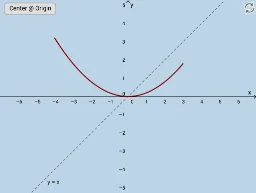
This example demonstrates the relationship and symmetry between inverse functions and their original graphs. Key math concepts include the definition of inverse functions, symmetry of function graphs, and properties of linear functions. Construction highlights involve using Mirror to create symmetric images, Textfield for displaying function information, multiple InputBoxes for user input, sliders for parameter adjustments, and objects like f, g, f_1, etc., to represent functions. Suitable for high school mathematics education to understand inverse function properties and dynamically visualize function graph transformations.
GeoGebra Commands & Parameters
Mirror(f, g) → f_1Textfield(f) → InputBox1Mirror(h, g) → h_1Textfield(a) → InputBox2Textfield(b) → InputBox3Mirror(f, g) → f_2
AI Drawing Prompt Reference
Draw the graph of a function and its inverse, showing the symmetry about the line y=x, use sliders to adjust function parameters, and display function expressions and parameter values, first draw the original function graph, then obtain the inverse function graph through a mirror operation, and use text boxes to label function information.
The prompt above was compiled from the original drawing commands and is for reference only.