
Introduction to Vectors Activity
Loading the math board and drawing, please wait…
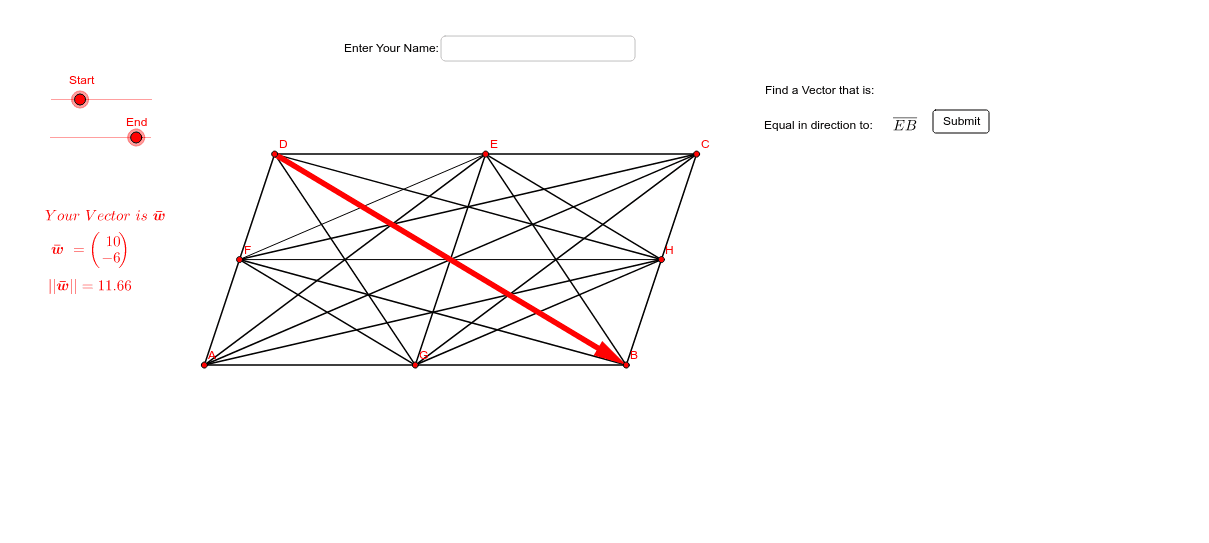
This example demonstrates how students create vectors using sliders and answer questions about vector magnitude and direction. Core math concepts include vectors, magnitude, direction, similar triangles, and coordinate geometry. It uses commands/objects like Segment, Midpoint, Vector, Length, UnitVector, and Textfield in GeoGebra. Suitable for high school mathematics instruction, introducing and practicing vector concepts.
GeoGebra Commands & Parameters
Segment(A, B) → aSegment(D, C) → a_1Segment(D, A) → bSegment(C, B) → cMidpoint(D, C) → EMidpoint(D, A) → FMidpoint(A, B) → GMidpoint(B, C) → HSegment(D, G) → dSegment(G, E) → eSegment(E, B) → fSegment(C, G) → gSegment(E, A) → hSegment(F, B) → iSegment(F, C) → jSegment(D, H) → kSegment(A, H) → lSegment(G, H) → mSegment(F, G) → nSegment(E, H) → pSegment(B, D) → rSegment(A, C) → sVector(Element[Points, Start], Element[Points, End]) → wLength(w) → oUnitVector(w) → uSegment(F, E) → tSegment(F, H) → b_1Textfield() → Name