
Introduction to the Unit Circle
Loading the math board and drawing, please wait…
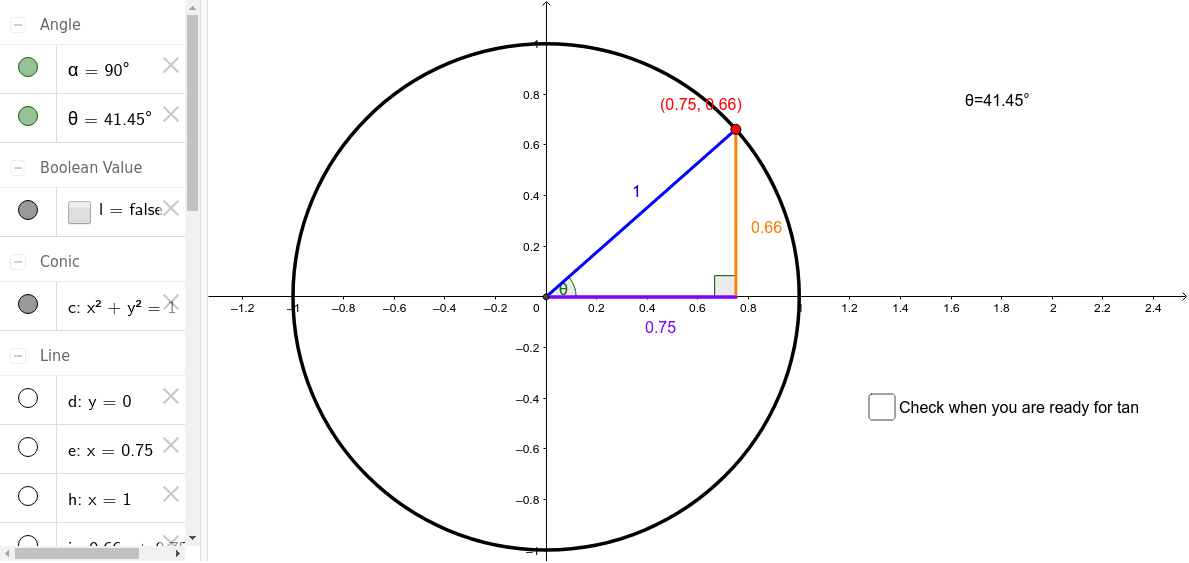
This example demonstrates the construction of the unit circle and its relationship with trigonometric functions. Key math concepts include circle, angle, and trigonometric functions. Construction highlights the use of GeoGebra commands and objects like Intersect, Circle, Segment, Point, Line, OrthogonalLine, and Angle. Suitable for high school mathematics teaching and beginners learning the basics of trigonometric functions and the unit circle.
GeoGebra Commands & Parameters
Intersect(xAxis, yAxis) → ACircle(A, B) → cSegment(A, B) → aPoint(c) → CSegment(A, C) → bLine(B, A) → dOrthogonalLine(C, a) → eIntersect(d, e) → DSegment(D, C) → fSegment(D, A) → gAngle(C, D, A) → αAngle(B, A, C) → θOrthogonalLine(B, d) → hLine(A, C) → iIntersect(h, i) → ESegment(A, E) → jSegment(B, E) → k
AI Drawing Prompt Reference
Draw a unit circle and mark the center O and points A and B, connect OA and OB, construct angle AOB, then take point C on the circle, draw a perpendicular from C to OC, and let it intersect the perpendicular from O to OA at point D, connect CD and AD, label angle CAD and angle OAB, and finally draw a perpendicular from B to OA and let it intersect AC at point E, then connect AE and BE.
The prompt above was compiled from the original drawing commands and is for reference only.