
Introduction to the Unit Circle: Visualizing Trigonometry
Loading the math board and drawing, please wait…
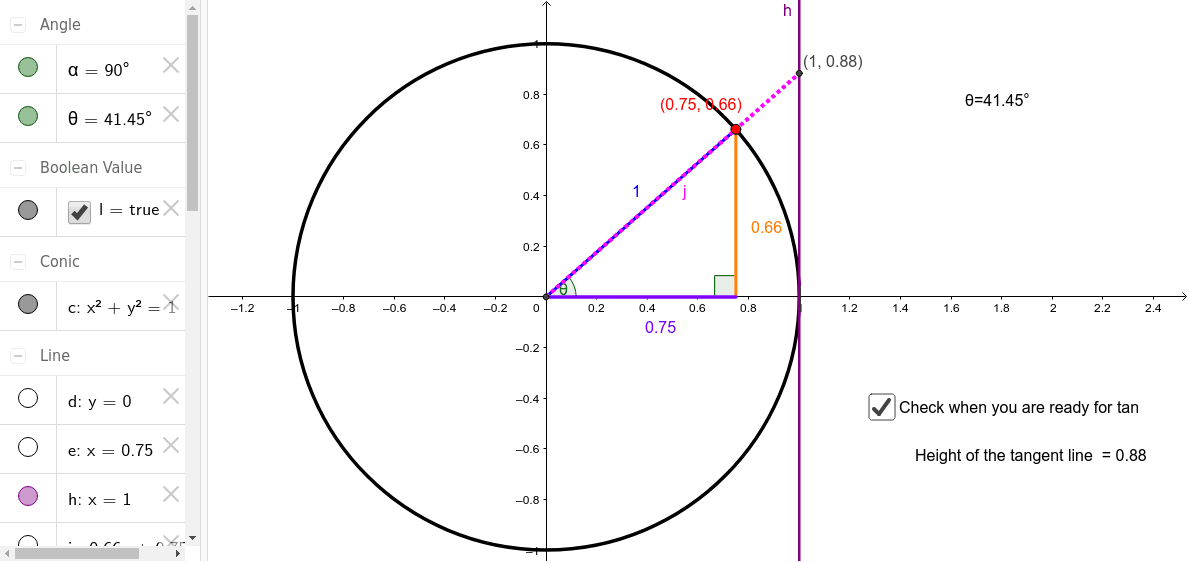
This GeoGebra example provides an interactive introduction to the unit circle, demonstrating how a point moving along the circle relates to angles and trigonometric functions. The core mathematical concepts include the unit circle definition, radian measure, sine and cosine functions, and angle rotation. The construction uses commands such as Intersect to find circle-axis intersections, Circle to draw the unit circle, Segment and Line to create radii and tangents, OrthogonalLine for perpendiculars, and Angle to label angles α and θ. By dragging a point or using a slider, learners can observe how coordinates and segment lengths change with the angle, linking geometric visualization to algebraic function values. This resource is ideal for high school students studying trigonometry or pre-calculus, and serves as a foundational tool for understanding periodic functions and the relationship between angles and coordinates.
GeoGebra Commands & Parameters
Intersect(xAxis, yAxis) → ACircle(A, B) → cSegment(A, B) → aPoint(c) → CSegment(A, C) → bLine(B, A) → dOrthogonalLine(C, a) → eIntersect(d, e) → DSegment(D, C) → fSegment(D, A) → gAngle(C, D, A) → αAngle(B, A, C) → θOrthogonalLine(B, d) → hLine(A, C) → iIntersect(h, i) → ESegment(A, E) → jSegment(B, E) → k
AI Drawing Prompt Reference
Draw a unit circle centered at the origin with a radius from the origin to a point on the positive x-axis. Place a draggable point on the circle and connect it to the center with a radius. From this point, draw a perpendicular to the radius, intersecting the horizontal line through the center, forming a small right triangle. Label the angle at the intersection as α and the angle at the center as θ. Then draw a line through the circle point perpendicular to the horizontal axis, intersecting the vertical line through the center, forming another right triangle, and mark its relevant segments. Show how coordinates and segment lengths change with the angle.
The prompt above was compiled from the original drawing commands and is for reference only.