
Introduction to Dilations by Kim Kembitzky
Loading the math board and drawing, please wait…
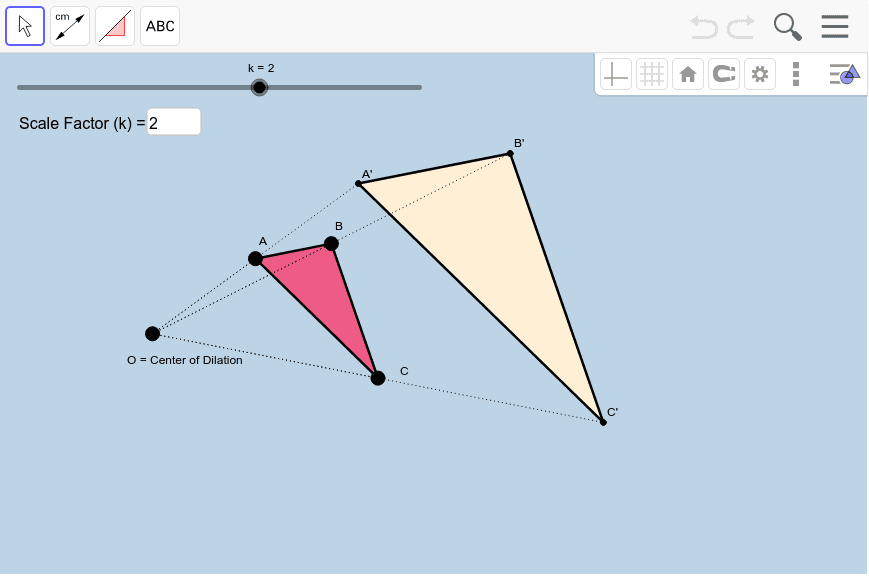
This applet demonstrates the concept of dilations using GeoGebra, focusing on how to perform similarity transformations by specifying a center of dilation and a scale factor. It utilizes commands such as Polygon, Segment, Textfield, and Dilate. Suitable for middle school and above students to learn the basic principles of dilations.
GeoGebra Commands & Parameters
Polygon(A, B, C) → poly1, c, a, bSegment(A, B) → dSegment(B, C) → eSegment(C, A) → fTextfield(k) → InputBox1Dilate(A, k, O) → A'Dilate(B, k, O) → B'Dilate(C, k, O) → C'Polygon(A', B', C') → poly1', c', a', b'Dilate(A, k, O) → A'_1Dilate(B, k, O) → B'_1Segment(A'_1, B'_1) → d'Dilate(B, k, O) → B'_2Dilate(C, k, O) → C'_1Segment(B'_2, C'_1) → e'Dilate(C, k, O) → C'_2Dilate(A, k, O) → A'_2Segment(C'_2, A'_2) → f'Segment(O, A') → gSegment(O, A) → hSegment(O, B) → iSegment(O, B') → jSegment(O, C') → lSegment(O, C) → m
AI Drawing Prompt Reference
Draw a triangle ABC, then perform a dilation centered at point O with a scale factor controlled by a slider k to obtain triangle A'B'C'. First, draw the three sides of triangle ABC, then create a slider k to represent the scale factor. Choose point O as the center and use slider k to dilate the triangle, obtaining the three sides of triangle A'B'C'. Finally, connect point O to the corresponding vertices of triangles A'B'C' and ABC to observe the effect of the similarity transformation.
The prompt above was compiled from the original drawing commands and is for reference only.