
Introducing Derivatives with the Slope Function
Loading the math board and drawing, please wait…
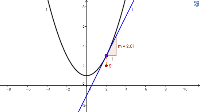
This example demonstrates how to introduce the concept of derivatives using the slope function in GeoGebra. It illustrates how to understand the geometric meaning of derivatives by plotting a function and calculating the slope of the tangent line. Core mathematical concepts involved include derivatives, terms, kite, indefinite integral, incircle or inscribed circle, and integers. Construction highlights involve using GeoGebra commands like Point, Tangent, Slope, and Segment, along with objects such as f, A, a, m, S, and b. This example is suitable for calculus instruction, helping students visually grasp the definition and application of derivatives.
GeoGebra Commands & Parameters
Point(f) → ATangent(A, f) → aSlope(a) → mSegment(A, S) → b
AI Drawing Prompt Reference
Draw a function graph, mark a point on it, draw a tangent line from the point, calculate and display the slope of the tangent, and finally connect the point to the slope value to show the geometric meaning of the derivative.
The prompt above was compiled from the original drawing commands and is for reference only.