
Intersection Points of a Cube
Loading the math board and drawing, please wait…
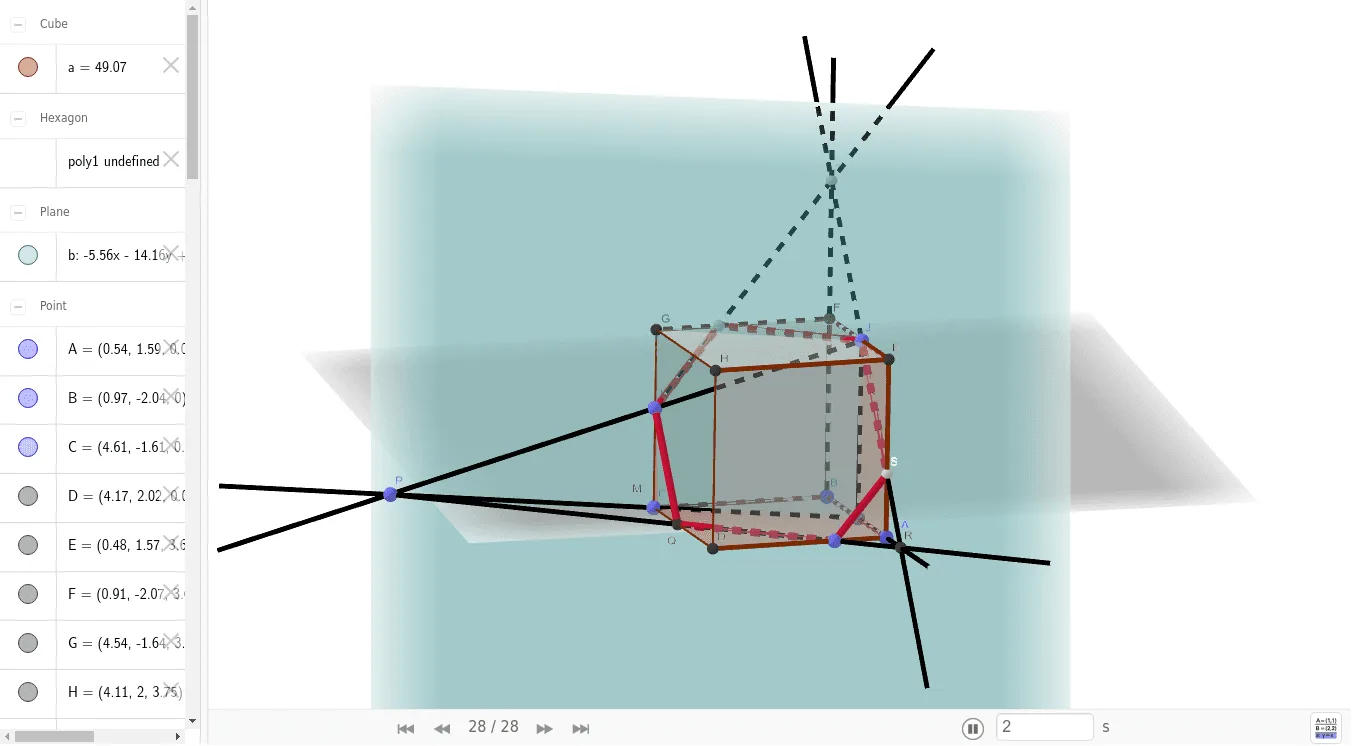
This example demonstrates the intersection points of a cube. Key mathematical concepts include solid geometry, vectors, and angles. It is constructed using GeoGebra commands such as Point, Cube, Segment, and Intersect. Suitable for high school solid geometry education.
GeoGebra Commands & Parameters
Point(Circle[B, Distance[A, B], Segment[A, B]]) → CCube(A, B, C) → a, D, წახნაგიCDHG, წახნაგიEFGH, წიბოAD, წიბოAB, წიბოBC, წიბოCD, წიბოAE, წიბოDH, წიბოEH, წიბოEF, E, წიბოBF, წიბოFG, წიბოCG, წიბოGH, F, G, H, წახნაგიABCD, წახნაგიADHE, წახნაგიABFE, წახნაგიBCGFPoint(წიბოCG) → IPoint(წიბოEF) → JPoint(წიბოAD) → KPoint(წიბოAB) → LSegment(J, L) → fPlane(J, L, I) → bIntersect(წიბოCD, წიბოBC) → MRay(L, M) → gRay(J, I) → hIntersect(g, h) → NIntersect(h, g) → OPoint(g) → PRay(P, K) → iIntersect(i, წიბოCD) → QRay(B, A) → jIntersect(i, j) → RRay(J, R) → kIntersect(წიბოAE, k) → SRay(B, F) → lRay(S, J) → mIntersect(l, m) → TRay(I, T) → nIntersect(n, წიბოFG) → UPolygon(S, K, Q, I, U, J) → poly1, s, k_1, q, i_1, u, j_1
AI Drawing Prompt Reference
Draw a cube and label the intersection points of its edges and faces. Start by plotting three vertices to construct the cube. Then, find and mark the intersection points where the diagonals meet the faces. Finally, connect some of these points to form a new polygon, highlighting the internal spatial structure of the cube.
The prompt above was compiled from the original drawing commands and is for reference only.