
Intersection of Two Lines: Solving a Linear System Geometrically
Loading the math board and drawing, please wait…
In collections
学习 GeoGebra 经典应用
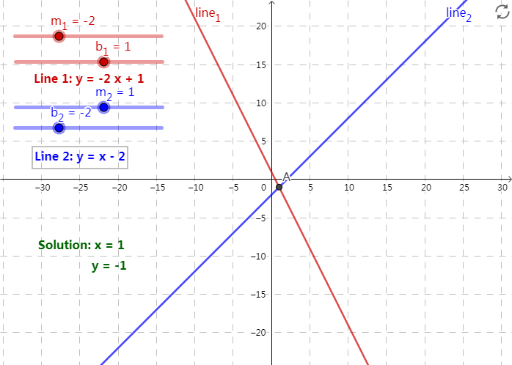
This example demonstrates the key geometric idea behind a linear system: the solution corresponds to the intersection point of two lines. It visualizes how two linear equations (represented by lines) jointly determine a single solution when they intersect. The main mathematical concepts include linear functions, the slope–intercept form of lines, the equivalence between solving a system and finding common points, and interpreting the intersection coordinates as the solution values. Construction-wise, it uses GeoGebra’s Intersect command to compute the intersection of line1 and line2, producing the point A, with its coordinates provided by xcoordinate and ycoordinate. The parameters m1, b1, m2, and b2 define the two lines’ slopes and intercepts, while text1, text2, text3, and text4 are used to label equations and/or the coordinates for clarity. Suitable for middle/high school algebra and coordinate geometry, as well as interactive learning modules that teach the graphing method for systems of linear equations.
GeoGebra Commands & Parameters
Intersect(line_{2}, line_{1}) → A
AI Drawing Prompt Reference
Draw a graph showing the intersection point of two lines, including the equations of the two lines and the coordinates of the intersection point. The slopes and intercepts of the two lines are defined by m1, b1 and m2, b2 respectively. The coordinates of the intersection point are given by xcoordinate and ycoordinate. Label the equations of the two lines and the coordinates of the intersection point, and express the equations of the lines in slope-intercept form.
The prompt above was compiled from the original drawing commands and is for reference only.