
Intersection and Angle Between Two Lines in 3D Space by Angateeah
Loading the math board and drawing, please wait…
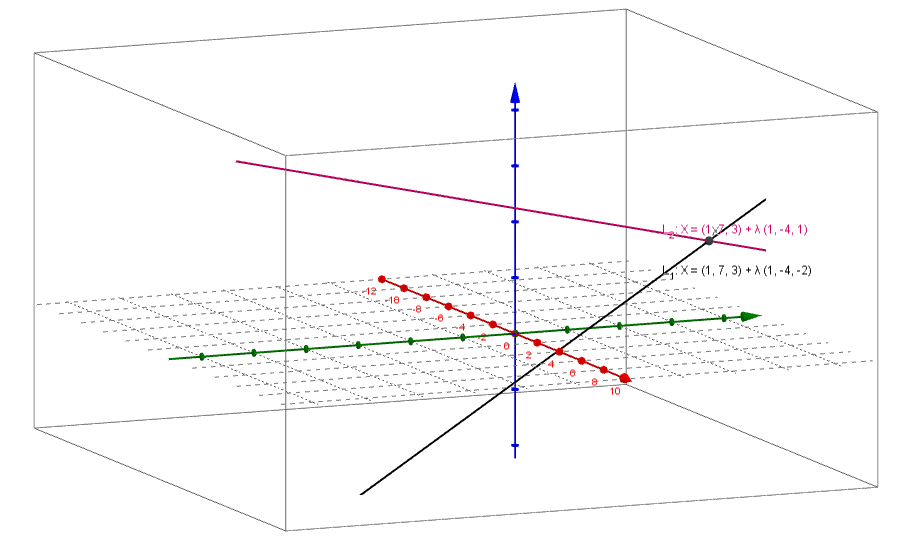
This example demonstrates how to find the intersection point and the angle between two lines in 3D space. Key mathematical concepts include the intersection of lines and the angle between them. Using GeoGebra commands such as Line, Intersect, and Angle, the construction of these lines is illustrated. Suitable for high school mathematics education or students learning coordinate geometry.
GeoGebra Commands & Parameters
Line(A, B) → L_1Line(C, D) → L_2Textfield(A) → InputBox1Textfield(B) → InputBox2Textfield() → InputBox3Textfield(C) → InputBox4Textfield(D) → InputBox5Textfield(A) → InputBox6Textfield(B) → InputBox7Intersect(L_1, L_2) → XAngle(L_1, L_2) → αAngle(dd, dl2) → βLaTeX(β, true, true) → text15Line((0, 0, 0), DD) → kLine((0, 0, 0), DL2) → lAngle(k, l) → γ
AI Drawing Prompt Reference
Draw two lines in 3D space, each defined by two draggable points with input boxes for adjusting their coordinates. Find and display the intersection point of the two lines. Measure and show the angle between the two lines. Additionally, from the origin, draw two rays along the direction vectors of the lines, measure the angle between these rays, and display that angle as a formula. The scene should clearly show the geometric relationships in a 3D coordinate system for studying line intersections and angles.
The prompt above was compiled from the original drawing commands and is for reference only.