
Interactive Verification of Law of Sines and Cosines
Loading the math board and drawing, please wait…
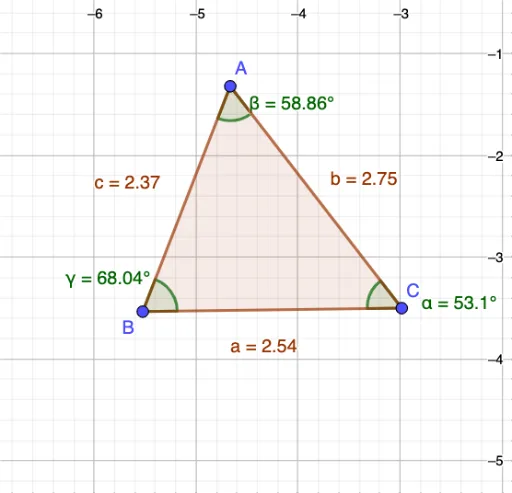
①This example demonstrates the numerical verification of the Law of Sines and the Law of Cosines using a dynamic triangle, where dragging vertices updates side lengths and angles in real time. ②Core mathematical concepts include the Law of Sines (a/sinα = b/sinβ = c/sinγ) and the Law of Cosines (c² = a² + b² - 2ab·cosγ), along with the triangle angle sum property. ③Construction details: using GeoGebra commands Polygon to create triangle ABC and Angle to mark interior angles α, β, γ; side lengths a, b, c and angle measures are used to compute both sides of the theorem equations, with dynamic updates via vertex dragging or sliders. ④Suitable for high school or early college students to grasp the geometric meaning of trigonometric identities, and for teachers as a classroom demonstration tool to visually compare theorem applicability across different triangle shapes.
GeoGebra Commands & Parameters
Polygon(A, B, C) → t1, c, a, bAngle(A, C, B) → αAngle(B, A, C) → βAngle(C, B, A) → γ
AI Drawing Prompt Reference
Draw a triangle ABC and mark its three interior angles α, β, and γ. Use dragging the vertices to dynamically show the lengths of the three sides a, b, and c, and the degree measures of the angles. Calculate both sides of the sine and cosine laws using the side lengths and angle measures, and observe the applicability of these laws as the triangle shape changes.
The prompt above was compiled from the original drawing commands and is for reference only.