
Interactive Rectangle Area Exploration
Loading the math board and drawing, please wait…
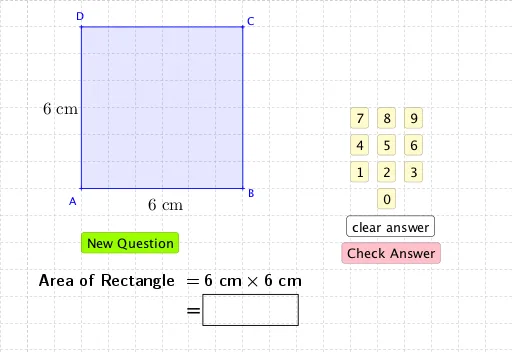
① This GeoGebra example dynamically demonstrates the calculation of the area of a rectangle, allowing users to drag sliders or click buttons to change the rectangle's length and width, and observe the area value update in real time. ② The core mathematical concept is the rectangle area formula (Area = length × width), along with basic geometry and algebra topics such as random number generation, midpoint construction, polygon creation, and conditional logic. ③ Construction highlights: the Random command generates initial dimensions, Midpoint helps position auxiliary points, Polygon draws the rectangle, and If controls conditional display; objects include sliders (a, b), buttons (button1 to button12), text boxes (text1 to text8), and polygon poly1, all linked through interactive controls for dynamic adjustment and feedback. ④ Suitable for upper elementary to middle school students to grasp the concept of area, and useful for teacher-led demonstrations or student self-exploration, fostering geometric intuition and dynamic thinking.
GeoGebra Commands & Parameters
Random(2, 6) → hRandom(3, 9) → bMidpoint(A, B) → EMidpoint(A, D) → FPolygon(D, A, B, C) → poly1, d, a_1, b_1, cIf(a < aa, rr_1 = 1, rr_2 = 1) →If(a < aa, rr_1 = 1, rr_2 = 1) →If(a < aa, rr_1 = 1, rr_2 = 1) →If(a < aa, rr_1 = 1, rr_2 = 1) →If(a ≟ aa, rr_1 = 1, rr_2 = 1) →If(a ≟ aa, rr_1 = 1, rr_2 = 1) →If(a ≟ aa, rr_1 = 1, rr_2 = 1) →If(a ≟ aa, rr_1 = 1, rr_2 = 1) →
AI Drawing Prompt Reference
Create an interactive rectangle area exploration. The rectangle has four vertices, with initial length and width generated randomly (length between 3 and 9, width between 2 and 6). Place two midpoints on the rectangle's sides as auxiliary points. Add two sliders to control the length and width; dragging them updates the rectangle shape and displays the area value in real time. Include several buttons for quick adjustments or conditional checks, such as showing different states when length is less than or equal to a threshold. Use text boxes to show current length, width, and area. The layout is clear, suitable for students to explore how changing dimensions affects area.
The prompt above was compiled from the original drawing commands and is for reference only.