
Maximize the Area with Fixed Perimeter
Loading the math board and drawing, please wait…
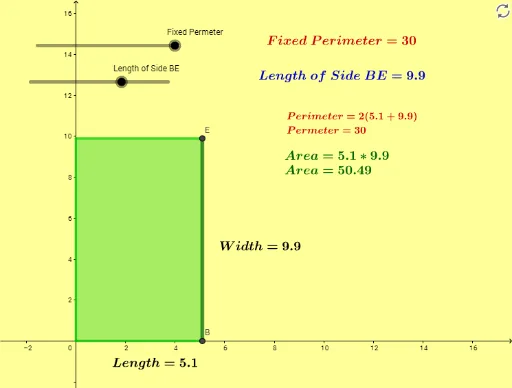
This example demonstrates how to maximize the area of a polygon when the perimeter is held constant, illustrating the isoperimetric theorem in an interactive way. Core mathematical concepts include the relationship between area and perimeter, geometric optimization, and the fact that a circle encloses the maximum area for a given perimeter. Construction highlights: using GeoGebra commands such as Intersect, OrthogonalLine, Polygon, PointIn, and Midpoint to build a dynamic polygon, with sliders or buttons to adjust parameters, while the area and perimeter are computed in real time to observe how area changes with shape. Suitable for upper secondary or early university students to explore geometric extremum problems, function optimization ideas, and the use of dynamic geometry software in mathematical experimentation.
GeoGebra Commands & Parameters
Intersect(c, yAxis) → C, DOrthogonalLine(D, yAxis) → fOrthogonalLine(B, xAxis) → gIntersect(f, g) → EPolygon(A, B, E, D) → q1, a, b, e, dPointIn(q1) → Pointq1Midpoint(a) → FMidpoint(b) → G
AI Drawing Prompt Reference
Draw a dynamic polygon with a fixed perimeter to illustrate the isoperimetric theorem. Start by marking two points on the coordinate axes: one on the y-axis and one on the x-axis. From the y-axis point, draw a line perpendicular to the y-axis; from the x-axis point, draw a line perpendicular to the x-axis. These two lines intersect at a point, forming a rectangle with the origin and the two axis points. Place a random point inside the rectangle, and mark the midpoints of two adjacent sides. Adjust the rectangle's shape by changing the side lengths while keeping the perimeter constant, and observe how the area changes, noting that the area is maximized when the rectangle approaches a square, and ultimately a circle encloses the maximum area for a given perimeter.
The prompt above was compiled from the original drawing commands and is for reference only.