
Area and Perimeter of Rectangle with Fixed Perimeter
Loading the math board and drawing, please wait…
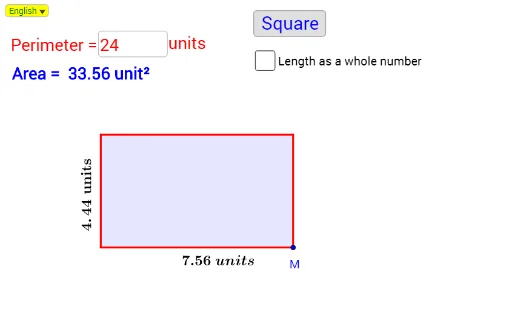
① This example demonstrates how the area of a rectangle changes with its side lengths when the perimeter is fixed, showing that the maximum area occurs when the rectangle is a square. ② Core mathematical concepts include the area and perimeter formulas for rectangles, quadratic functions, optimization (finding maximum), and variable dependency. ③ Construction highlights: sliders (a, b) control side lengths; Point, Line, and Polygon construct the rectangle; Area command computes area; Distance measures sides; DynamicCoordinates updates positions; Textfield and InputBox allow interactive input; OrthogonalLine and Intersect help build perpendicular relations; Midpoint marks centers; VerticalText and Text display labels; Div performs division; a button may reset or trigger calculations. ④ Suitable for middle school to high school students learning geometry and algebra, useful for exploring quadratic maxima, rectangle properties, and dynamic math experiments.
GeoGebra Commands & Parameters
SelectedIndex(Bahasa) → nnLine(A, xAxis) → aPoint(a) → GDistance(A, G) → DPjIf(b ≟ true, round(DPj), DPj) → RABDynamicCoordinates(G, x(H), y(H)) → BDistance(A, B) → PjIf(nn ≟ 1, If[Tinggi ≟ 1, " unit", " units"], " unit") → textUTTextfield(Pr) → InputBox1Circle(A, Tinggi) → cOrthogonalLine(A, a) → dIntersect(c, d, 2) → COrthogonalLine(C, d) → eOrthogonalLine(B, a) → fIntersect(e, f) → DPolygon(A, B, D, C) → poly1, a_1, b_1, d_1, c_1Area(poly1) → LuasMidpoint(A, B) → EVerticalText(Text[Tinggi] + textUT) → VTextMidpoint(A, C) → FDiv(Pr - 1, 2) → MaxPjIf(nn ≟ 1, If[Pj ≟ 1, " unit", " units"], " unit") → textUPIf(nn ≟ 1, "units", "unit") → text4If(nn ≟ 1, "Area = ", "Luas = ") → text5
AI Drawing Prompt Reference
Draw a rectangle with a fixed perimeter. Use two sliders to control its length and width. Start with a horizontal base line, place a movable point on it as one vertex, then draw a perpendicular line from that point to set the height, and complete the rectangle. Display the area value and label the side lengths. Also show a note that the area is maximized when the rectangle is a square.
The prompt above was compiled from the original drawing commands and is for reference only.