
Visualizing and Ordering Fractions
Loading the math board and drawing, please wait…
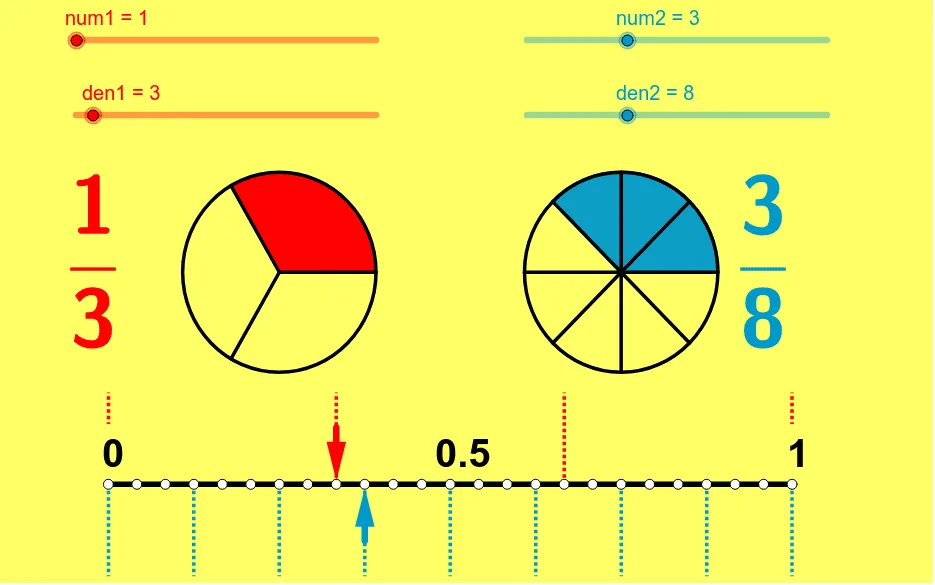
① This applet demonstrates how to compare and order fractions using visual representations such as circle sectors and segment lengths. ② The core mathematical concepts include fraction comparison, ordering, and the use of least common multiple (LCM) to find common denominators. ③ Construction highlights: GeoGebra commands such as Sequence, CircleSector, Segment, Vector, and LCM are used; objects include multiple points, segments, lists (list1 to list7), and text labels (text1 to text5) to dynamically show comparisons. ④ Suitable for upper elementary to middle school students learning fraction concepts, and useful for teachers in classroom demonstrations or for students to explore fraction ordering interactively.
GeoGebra Commands & Parameters
Sequence((sqrt(2) * cos(i * 360 * ° / den1) + x(B), sqrt(2) * sin(i * 360 * ° / den1) + y(B)), i, 1, den1) → leftptsSequence((sqrt(2) * cos(i * 360 * ° / den2) + x(A), sqrt(2) * sin(i * 360 * ° / den2) + y(A)), i, 1, den2) → rightptsSequence(Segment[B, Element[leftpts, i]], i, 1, den1) → segleftSequence(Segment[A, Element[rightpts, i]], i, 1, den2) → segrightCircleSector(B, Element[leftpts, den1], Element[leftpts, num1]) → eCircleSector(A, Element[rightpts, den2], Element[rightpts, num2]) → fSegment(D, C) → aVector(F, E) → uVector(G, H) → vSequence((-5 + i * 10 / den1, 0), i, 0, den1) → list1Sequence((-5 + i * 10 / den1, 1.3), i, 0, den1) → list2Sequence(Segment[Element[list1, i], Element[list2, i]], i, 1, den1 + 1) → list3Sequence((-5 + i * 10 / den2, 0), i, 0, den2) → list4Sequence((-5 + i * 10 / den2, -1.3), i, 0, den2) → list5Sequence(Segment[Element[list4, i], Element[list5, i]], i, 0, den2 + 1) → list6LCM(den1, den2) → bSequence((-5 + i * 10 / b, 0), i, 0, b) → list7