
Triangle to Parallelogram
Loading the math board and drawing, please wait…
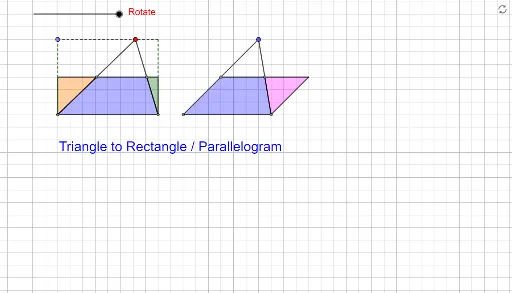
This example demonstrates how to transform a triangle into a parallelogram using geometric construction. Key mathematical concepts include triangles, parallelograms, and geometric construction. It utilizes commands such as Segment, OrthogonalLine, Point, Line, Intersect, Midpoint, Polygon, and Rotate in GeoGebra. Suitable for middle school and above students to learn geometric transformations and construction techniques.
GeoGebra Commands & Parameters
Segment(B, C) → gSegment(D, E) → iSegment(E, F) → jSegment(F, D) → kOrthogonalLine(B, g) → fPoint(f) → AOrthogonalLine(C, g) → hLine(A, g) → lIntersect(h, l) → GSegment(A, G) → mPoint(m) → HMidpoint(H, B) → IMidpoint(H, C) → JPolygon(I, J, C, B) → q1, i_1, j_1, c, bOrthogonalLine(H, g) → nOrthogonalLine(I, n) → pIntersect(n, p) → LPolygon(I, L, H) → t1, h_1, i_2, l_1Polygon(L, H, J) → t2, j_2, l_2, h_2Segment(H, B) → qSegment(H, C) → rRotate(I, t°, I) → I'Rotate(L, t°, I) → L'Rotate(H, t°, I) → H'Polygon(I', L', H') → t1', h', i', l'Segment(H', L') → sSegment(L', I) → aSegment(I, H') → dRotate(L, (-(t°)), J) → L'_1Rotate(H, (-(t°)), J) → H'_1Rotate(J, (-(t°)), J) → J'Polygon(L'_1, H'_1, J') → t2', j', l'_1, h'_1Segment(L'_1, H'_1) → eSegment(H'_1, J) → f_1Segment(J, L'_1) → g_1Segment(A, B) → k_1Segment(G, C) → m_1Midpoint(E, D) → KMidpoint(E, F) → MPolygon(K, M, E) → t3, e_1, k_2, m_2Polygon(D, K, M, F) → q2, d_1, k_3, m_3, f_2Rotate(K, (-(t°)), M) → K'Rotate(M, (-(t°)), M) → M'Rotate(E, (-(t°)), M) → E'Polygon(K', M', E') → t3', e', k', m'Segment(M, K') → n_1Segment(K', E') → p_1Segment(E', M) → q_1Segment(I, J) → r_1Segment(K, M) → s_1
AI Drawing Prompt Reference
Draw a triangle ABC and then construct a parallelogram by extending the midlines of AB and AC. First, find the midpoints D and E of AB and AC, then connect DE. Next, draw perpendicular lines from D and E to AB and AC, intersecting at points F and G. Connect FG to form a parallelogram DEFG. Then, rotate DEFG around point F to form a new parallelogram. Finally, construct a complete system of parallelograms through rotation and connection.
The prompt above was compiled from the original drawing commands and is for reference only.