
Interactive Exploration of Adding Adjacent Angles
Loading the math board and drawing, please wait…
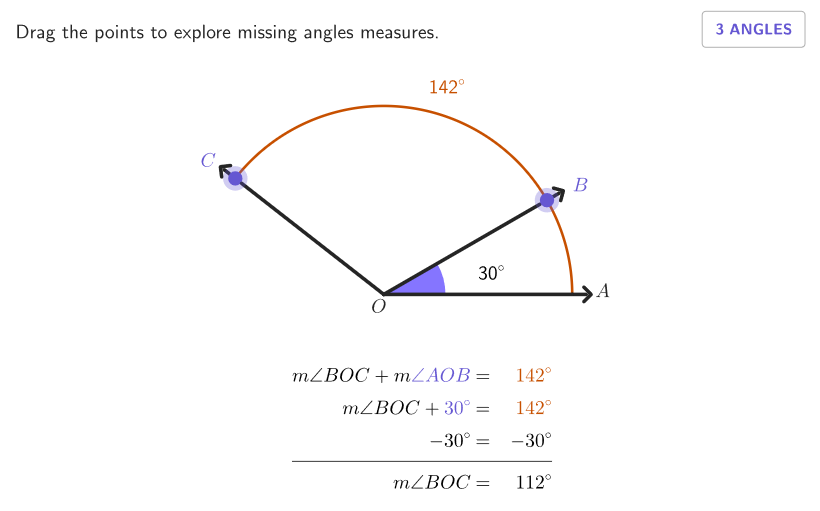
This GeoGebra lesson demonstrates how the measures of two or three adjacent (non-overlapping) angles combine additively to determine a larger angle, including key angle-sum results such as the angles that form a straight line. The main math ideas are angle addition, angle measure conservation (e.g., straight-line total), and using addition/subtraction to find unknown angle measures. Construction-wise, the model is built from geometric primitives: points define rays and angle vertices (Point), angles are explicitly labeled and measured (Angle), supporting shapes and boundaries are organized with segments, polygons, and curved references (Segment, Polygon, Curve, circle/Semicircle). The activity is wrapped in an interactive learning interface with inputs and feedback controls (onboarding, input boxes, showanswer/showsolution, tries, and correctness counters). Suitable for Grades 4–5 geometry and early middle-school angle fundamentals, especially for guided practice on computing unknown angles using adjacent-angle relationships.
GeoGebra Commands & Parameters
Semicircle((-2.5, 0), (2.5, 0)) → internalPoint(Sequence[(3.5; k), k, 1°, 180°, 1°]) → AFPoint(Sequence[(rEst; k), k, 0°, arg(AF), 1°]) → BAngle(A, O, B) → angAOBAngle(B, O, AF) → angBOFAngle(A, O, AF) → bigAPolygon(Zip[PixelsToPoint[Corner[1], Corner[3], Corner[5], A], A, {(pixelsLeft, pixelsTop), (pixelsLeft, y(Corner[5]) - pixelsBottom), Corner[5] - (pixelsRight, pixelsBottom), (x(Corner[5]) - pixelsRight, pixelsTop)}]) → borderBoxCorner(5) → layoutAppSizeonboardingTextOffset(Corner[onboardingText, 1], Corner[onboardingText, 3], onboardingCase, Corner[1], Corner[3], Corner[5]) → OnboardingTextOffsetAngle(C', O, AF) → angCOFPoint(Vector[(1.8 * UnitVector[AngularBisector[AA, O, BB]])], 1) → posLabelAOBPoint(Vector[(1.8 * UnitVector[AngularBisector[BB, O, AFF]])], 1) → posLabelBOFPoint(Vector[(1.8 * UnitVector[AngularBisector[CC, O, AFF]])], 1) → posLabelCOFPoint(Vector[(4.4 * UnitVector[AngularBisector[AA, O, AFF]])], 1) → posLabBigSegment(O, A) → segmStartSegment(O, B') → segmOBSegment(O, C') → segmOCAngle(B, O, C') → solCase3Point(Vector[(1.8 * UnitVector[AngularBisector[B', O, C']])], 1) → posLabelSol3Angle(B', O, AF) → solCase2Point(Vector[(1.8 * UnitVector[AngularBisector[B', O, AF]])], 1) → posLabelSol2Angle(A, O, B') → solCase1Point(Vector[(1.8 * UnitVector[AngularBisector[A, O, B']])], 1) → posLabelSol1Segment(O, AF') → segmODCurveCartesian((3.5 * cos(t)), (3.5 * sin(t)), t, 0, arg(AF)) → extArcSegment(O, FIN) → segmFINSegment(A, A + (0.35 * UnitVector[segmStart])) → tipOASegment(B, B + (0.35 * UnitVector[segmOB])) → tipOBSegment(C, C + (0.35 * UnitVector[segmOC])) → tipOCSegment(AF, AF + (0.35 * UnitVector[segmOD])) → tipODcirclePixels(AF, 7 + (7 * pulsing), Corner[1], Corner[3], Corner[5]) → pulsingObject1circlePixels(B, 7 + (7 * pulsing), Corner[1], Corner[3], Corner[5]) → pulsingObject2
AI Drawing Prompt Reference
Draw a horizontal semicircle with a draggable point on its arc, then create rays from the center through that point to form multiple adjacent angles. Construct three consecutive angles sharing a common vertex at the center, with their rays extending along the arc, forming a straight angle of 180 degrees. Add angle arcs and measure each angle, place bisector markers inside each angle near the vertex. Draw line segments from the center to the endpoint of each ray, with arrow tips at the segment ends indicating direction. The overall display shows three adjacent angles adding up to a straight line, demonstrating angle addition relationships.
The prompt above was compiled from the original drawing commands and is for reference only.