
Interactive Discovery of 30°-60°-90° Triangles
Loading the math board and drawing, please wait…
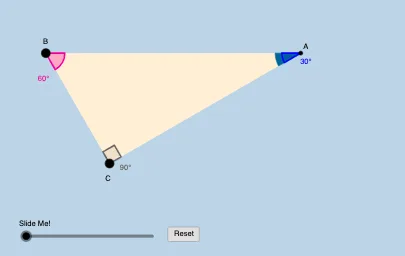
This GeoGebra activity interactively demonstrates how a 30°-60°-90° right triangle’s key angle settings and side-length relationships evolve through construction and geometric transformations. It centers on the geometry of right triangles, the characteristic 30-60-90 ratio (commonly 1:√3:2), and the use of circles (including circle sectors) to locate and verify angle/length constraints. Construction focuses on standard geometric tools: Ray and OrthogonalLine to build rays and perpendiculars, Rotate to generate the required angle positions, Angle to measure/label the central angle, Intersect plus Segment and Polygon to define intersections and triangle boundaries, and Circle/CircleSector to anchor the configuration. It further employs Dilate, Vector, Translate, and Midpoint to scale, reposition, and align constructed elements so learners can visually track how the triangle’s proportions persist under transformation. Suitable for middle/high school geometry lessons, exploratory learning, and problem-solving practice.
GeoGebra Commands & Parameters
Ray(B, C) → fOrthogonalLine(C, f) → gRotate(C, π / 3, B) → B'Angle(C, B, B') → αRay(B, B') → hIntersect(g, h) → ASegment(B, C) → iSegment(C, A) → jSegment(B, A) → kPolygon(B, C, A) → poly1, c_1, a, bCircle(A, (0.2 * i)) → eIntersect(e, k) → D,Intersect(e, j) → E,CircleSector(A, D, E) → dDilate(A, If[0 < l ≤ 1, 1 - l, 0], B) → C'Vector(A, C') → uTranslate(d, u) → d'Rotate(d', If[1 < l ≤ 2, (((l - 1) * 2) * π / 3), (2 * π / 3)], B) → d''Dilate(A, If[2 < l ≤ 3, 3 - l, 0], B) → C'_1Vector(A, C'_1) → vTranslate(d, v) → d'_1Rotate(d'_1, If[3 < l ≤ 4, (((-(l - 3)) * 7) * π / 6), (-7 * π / 6)], B) → pDilate(A, If[4 < l ≤ 5, 5 - l, 0], C) → C'_2Vector(A, C'_2) → wTranslate(d, w) → d'_2Dilate(A, If[6 < l ≤ 7, 7 - l, 0], C) → C'_3Vector(A, C'_3) → mTranslate(d, m) → d'_3Rotate(d'_2, If[5 < l ≤ 6, ((-(l - 5)) * π / 2), ((-π)) / 2], C) → qRotate(d'_3, If[7 < l ≤ 8, (((l - 7) * 4) * π / 3), (4 * π / 3)], C) → rDilate(A, If[8 < l ≤ 9, 9 - l, 0], C) → C'_4Vector(A, C'_4) → nTranslate(d, n) → d'_4Rotate(d'_4, If[9 < l ≤ 10, (((l - 9) * 7) * π / 6), (7 * π / 6)], C) → sMidpoint(B, A) → FDilate(B, If[10 < l ≤ 11, 11 - l, 0], C) → A'Segment(B, A') → tRotate(B, If[11 < l ≤ 12, ((l - 11) * π / 3), π / 3], B) → A'_1Rotate(A', If[11 < l ≤ 12, ((l - 11) * π / 3), π / 3], B) → A''Segment(A'_1, A'') → t'Dilate(B, If[12 < l ≤ 13, 13 - l, 0], F) → A'_2Vector(B, A'_2) → u_1Translate(B, u_1) → A'_3Translate(A', u_1) → A''_1Segment(A'_3, A''_1) → t'_1Rotate(A'_3, If[13 < l ≤ 14, ((l - 13) * π / 3), π / 3], F) → GRotate(A''_1, If[13 < l ≤ 14, ((l - 13) * π / 3), π / 3], F) → HSegment(G, H) → f_1Angle(B, A, C) → βAngle(C, B, A) → γAngle(A, C, B) → δ
AI Drawing Prompt Reference
This is an interactive geometry activity demonstrating a 30-60-90 right triangle through construction and transformations. Start by drawing rays and a perpendicular line, rotate to create specific angles, measure and label angles. Then define intersections and triangle boundaries with line segments and a polygon. Draw a circle and find its intersections with the triangle sides, then draw a circle sector to verify angle and side length constraints. Next, use transformations like dilation, translation, and rotation to scale, reposition, and align the triangle at different proportions, showing that its proportions remain consistent. This activity is suitable for middle and high school geometry lessons.
The prompt above was compiled from the original drawing commands and is for reference only.