
Inscribed Polygons by Matthew Hardie
Loading the math board and drawing, please wait…
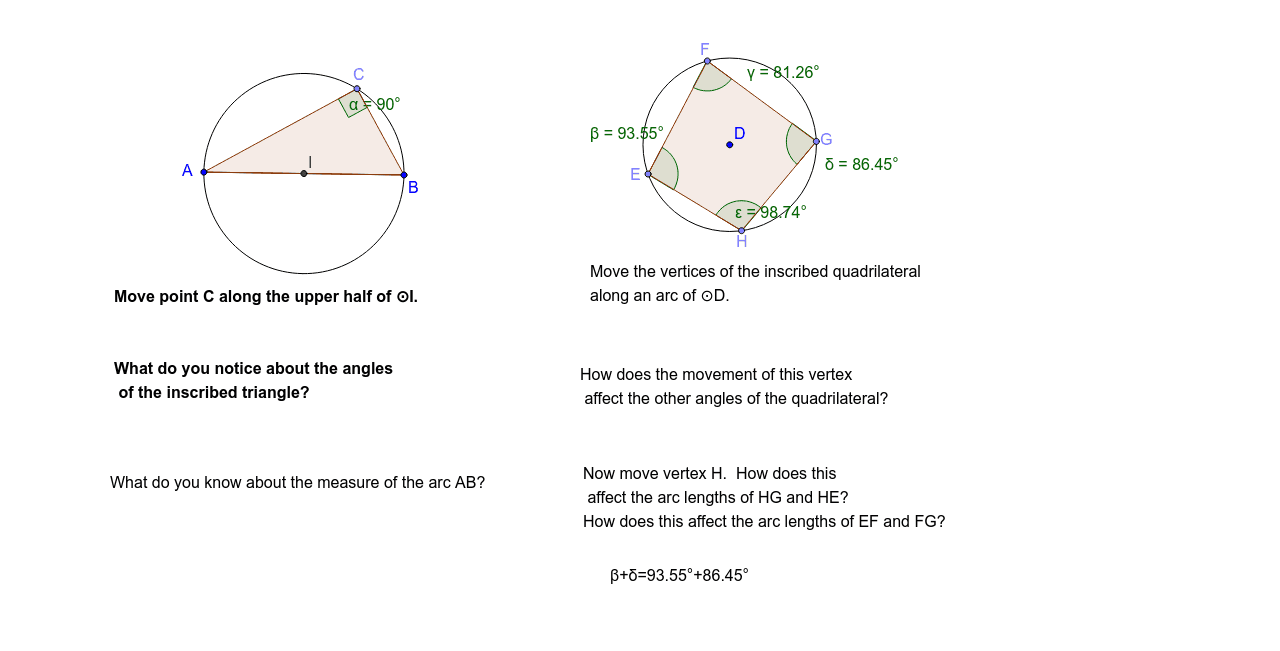
This example demonstrates the construction of inscribed polygons within a circle, focusing on geometric relationships between circles and polygons, angle calculations, and coordinate geometry. The construction involves GeoGebra commands such as Segment, Semicircle, Polygon, and Angle. Suitable for high school students learning geometric constructions and coordinate geometry. The content aims to help students understand the connection between polygons and circles and apply geometric tools effectively.
GeoGebra Commands & Parameters
Segment(B, A) → aSemicircle(B, A) → dSemicircle(A, B) → ePoint(e) → CPolygon(A, C, B) → poly1, b, a_1, cAngle(A, C, B) → αCircle(D, 8) → fPoint(f) → EPoint(f) → FPoint(f) → GPoint(f) → HPolygon(E, F, G, H) → poly2, e_1, f_1, g, hAngle(H, E, F) → βAngle(E, F, G) → γAngle(F, G, H) → δAngle(G, H, E) → εMidpoint(A, B) → I
AI Drawing Prompt Reference
Draw a horizontal segment as the base. Construct two semicircles with the segment's endpoints as diameter endpoints, one above and one below. Place a point on one semicircle and connect it to both endpoints to form a triangle, labeling its vertex angle. Then draw a larger circle, place four points on its circumference in order, and connect them to form a quadrilateral, labeling all four interior angles. Finally, mark the midpoint of the base segment.
The prompt above was compiled from the original drawing commands and is for reference only.