
Inscribed Isosceles Triangles in a Right-Angled Triangle
Loading the math board and drawing, please wait…
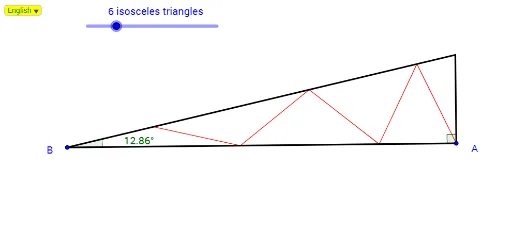
This example demonstrates the construction of inscribed isosceles triangles in a right-angled triangle. Key mathematical concepts include the properties of isosceles triangles and right-angled triangles, as well as rotation transformations. Using GeoGebra commands such as Line, Rotate, and Intersect, dynamic constructions of isosceles triangles can be achieved. Suitable for middle school and above students to learn geometric construction and transformations.
GeoGebra Commands & Parameters
Line(A, B) → bOrthogonalLine(A, b) → cRotate(A, Sd, B) → A'Angle(A, B, A') → αLine(B, A') → dIntersect(c, d) → CDistance(A, C) → ACSequence(((2 * AC) * cos((n * Sd))), n, a - 1, 1, -2) → DList0Sequence(Sum[DList0, n], n, 1, Length[DList0]) → DList1Slope(b) → GrZip(sqrt(n^(2) / (Gr^(2) + 1)), n, DList1) → PListxZip((n * Gr), n, PListx) → PListyZip((x(A) + (Arah * m), y(A) + (Arah * n)), m, PListx, n, PListy) → PListZip(LineBisector[n, m], n, Append[A, PList], m, PList) → BListZip(Intersect[n, d], n, BList) → PList2Zip(Segment[n, m], n, Append[A, PList], m, PList2) → Seg1Zip(Segment[n, m], n, PList2, m, PList) → Seg2Segment(B, C) → eSegment(C, A) → fSegment(A, B) → gAngle(C, A, B) → βSelectedIndex(Bahasa) → nn
AI Drawing Prompt Reference
Inside a right-angled triangle, draw several isosceles triangles with their vertices on the hypotenuse, where the base lengths vary with angles, and use rotation and symmetry transformations to create dynamic constructions, demonstrating the geometric relationship between isosceles and right-angled triangles.
The prompt above was compiled from the original drawing commands and is for reference only.