
Inscribed and Circumscribed Regular Polygons
Loading the math board and drawing, please wait…
In collections
Circle Constructions
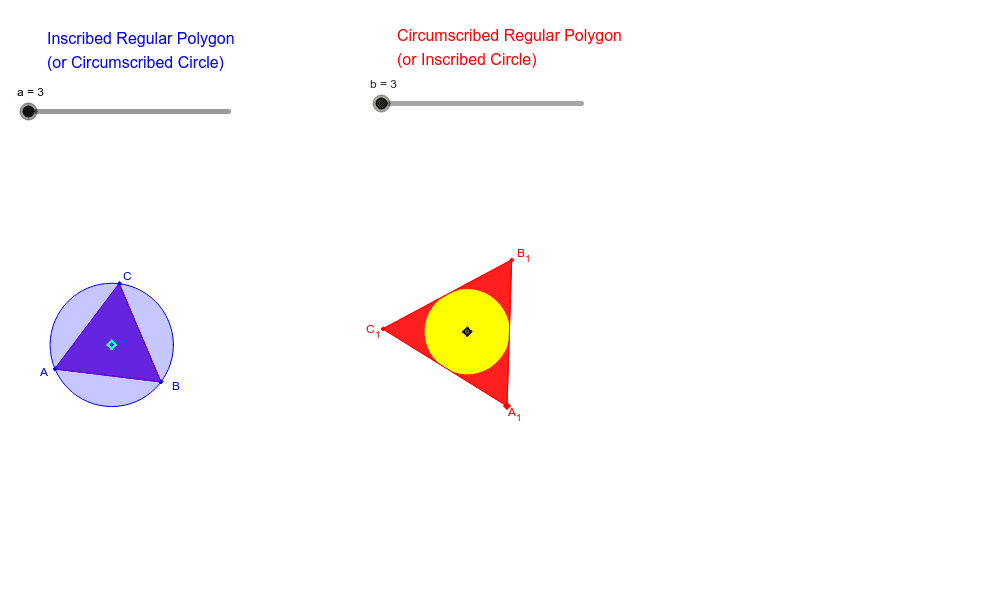
① This example demonstrates two classic relationships between regular polygons and circles: inscribed regular polygons (vertices on the circle) and circumscribed regular polygons (sides tangent to the circle), showing how they change with the number of sides. ② Core mathematical concepts include interior, exterior, and central angles of regular polygons, as well as the properties of inscribed and circumscribed circles, involving angle bisectors and perpendicular bisectors. ③ Construction highlights: from the construction summary, the GeoGebra commands used include Polygon, LineBisector (perpendicular bisector), AngularBisector (angle bisector), Intersect, and Circle, with many auxiliary objects (a_1, b_1, etc.) to build the figure step by step. ④ Suitable for middle or high school geometry classes to understand the relationship between regular polygons and circles, explore how inscribed and circumscribed polygons approach the circle as the number of sides increases, and serve as a dynamic demonstration of limit concepts.
GeoGebra Commands & Parameters
Polygon(A, B, a) → poly1, b_2, p, q, r, s, t, a_1, b_1, c_1, d_1, e_1, c, i_2, j_2, k_2, l_2, m_2, n_2, C, D, E, F, d, K, L, M, N, O, P, Q, R, S, T, e, U, V, W, A_2, B_2, C_2, D_2, E_2, F_2, f, g, l, m, nLineBisector(d) → hLineBisector(c) → iLineBisector(b_2) → jIntersect(j, b_2) → GIntersect(i, c) → HIntersect(h, d) → IIntersect(j, i) → YCircle(Y, C) → kPolygon(C_1, A_1, b) → poly2, f_1, c_2, e_2, f_2, g_2, h_2, p_2, q_2, r_2, s_2, t_2, g_1, a_3, B_1, I_1, J_1, K_1, L_1, H_1, S_1, T_1, U_1, h_1, V_1, W_1, Z_1, G_2, H_2, I_2, J_2, K_2, L_2, q_1, r_1, s_1, t_1, m_1, n_1AngularBisector(A_1, B_1, C_1) → i_1AngularBisector(C_1, A_1, B_1) → j_1AngularBisector(B_1, C_1, A_1) → k_1LineBisector(h_1) → l_1LineBisector(g_1) → p_1LineBisector(f_1) → a_2Intersect(p_1, g_1) → G_1Intersect(l_1, a_2) → ZIntersect(p_1, l_1) → M_1Intersect(l_1, h_1) → Q_1Intersect(a_2, f_1) → R_1Circle(M_1, Q_1) → d_2
AI Drawing Prompt Reference
Draw a circle and two regular polygons. One polygon is inscribed in the circle, with its vertices on the circle. The other polygon is circumscribed around the circle, with its sides tangent to the circle. As the number of sides increases, both polygons approach the circle. The construction involves drawing the circle first, then the inscribed polygon, and then the circumscribed polygon. Key objects include the circle, the vertices, sides, center points, and connecting lines.
The prompt above was compiled from the original drawing commands and is for reference only.