
Inscribe a Circle in a Triangle
Loading the math board and drawing, please wait…
In collections
Geometric Constructions
Geometric Constructions
Geometric Constructions-MINE
Geometric Constructions
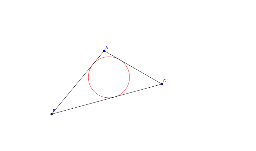
This example demonstrates how to inscribe a circle within a triangle. It involves core mathematical concepts such as triangles, circles, angle bisectors, perpendicular lines, and intersection points. The construction uses GeoGebra commands like Segment, AngularBisector, Intersect, OrthogonalLine, and Circle. It is suitable for middle school and above students to understand geometric constructions and the properties of incircles.
GeoGebra Commands & Parameters
Segment(A, B) → aSegment(B, C) → bSegment(C, A) → cAngularBisector(A, B, C) → dAngularBisector(A, C, B) → eIntersect(d, e) → DOrthogonalLine(D, b) → fIntersect(f, b) → ECircle(D, E) → target
AI Drawing Prompt Reference
Draw a triangle and find the angle bisector for each side. The intersection of these bisectors gives a point. From this point, draw a perpendicular line to one side to find a specific point on that side. Finally, draw a circle using this point and the intersection point as the center to get the incircle of the triangle.
The prompt above was compiled from the original drawing commands and is for reference only.