
Incenter Visualization
Loading the math board and drawing, please wait…
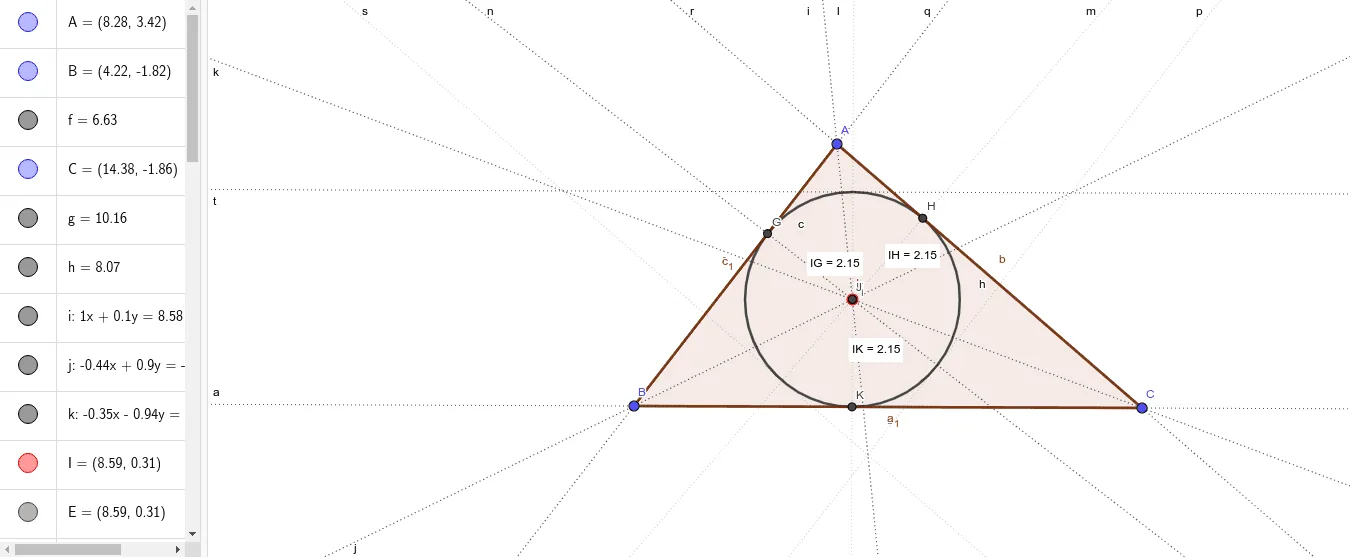
This example visualizes the incenter. Key mathematical concepts include angle bisectors, reflections, and vectors. Using GeoGebra commands such as Segment, AngularBisector, and Intersect, the incenter of a triangle can be constructed. Suitable for middle school and above students or teachers.
GeoGebra Commands & Parameters
Segment(A, B) → fSegment(B, C) → gSegment(A, C) → hAngularBisector(B, A, C) → iAngularBisector(C, B, A) → jAngularBisector(A, C, B) → kIntersect(k, i) → IIntersect(j, k) → EIntersect(j, k) → FOrthogonalLine(I, g) → lOrthogonalLine(I, h) → mOrthogonalLine(I, f) → nIntersect(l, m) → I_{1}Intersect(m, n) → JIntersect(n, f) → GIntersect(h, m) → HIntersect(l, g) → KDistance(I, K) → distanceDKDistance(I, H) → distanceDHDistance(I, G) → distanceDGCircle(I, K) → cTangent(f, c) → p, qTangent(h, c) → r, sTangent(g, c) → t, aPolygon(B, C, A) → t1, a_1, b, c_1
AI Drawing Prompt Reference
Please draw a triangle and its three sides. Then, draw the three angle bisectors of the triangle and find their intersection point as the incenter. Next, draw perpendicular lines from the incenter to the three sides of the triangle and find the intersection of these perpendicular lines. Draw a circle with the incenter as the center and a certain radius, and draw the tangents from the triangle's sides to this circle. Finally, draw the polygon of the triangle.
The prompt above was compiled from the original drawing commands and is for reference only.