
IM Alg2.2.7 Practice: Using Factors and Zeros of Polynomials
Loading the math board and drawing, please wait…
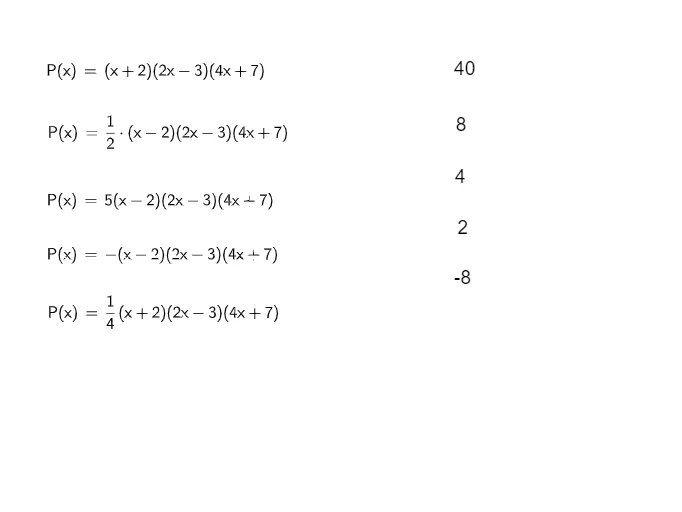
This GeoGebra example is a practice activity from Illustrative Mathematics Algebra 2, Unit 2, Lesson 7, focusing on using factors and zeros of polynomial functions. It demonstrates how to connect the factored form of a polynomial to its real zeros (x-intercepts) and how these zeros shape the graph. Key mathematical concepts include the factor theorem, the relationship between factors and roots, multiplicity of zeros, and the behavior of the graph at each intercept. The construction uses multiple objects (a through l), likely involving polynomial expressions, plotted graphs, movable points or sliders to explore how changing factors affects the zeros, and possibly dynamic labels for coordinates. This resource is ideal for high school Algebra 2 students to practice factoring polynomials, solving equations, and interpreting graphs, as well as for teachers to illustrate the algebraic-geometric connection in a visual, interactive way.
GeoGebra Commands & Parameters
Formula aFormula bFormula cFormula dFormula eFormula fInlinetext gInlinetext hInlinetext iInlinetext jInlinetext kInlinetext l
AI Drawing Prompt Reference
Draw a polynomial function graph to show the relationship between its factored form and zeros. Start by entering the factored form of the polynomial, then plot the graph based on this expression. Add several key points to represent the zeros of the polynomial and use sliders to adjust the coefficients of the polynomial, observing how the zeros and the graph change. Finally, dynamically display the coordinates of each zero to understand the relationship between the zeros and the graph.
The prompt above was compiled from the original drawing commands and is for reference only.