
IM 8.7.15 Practice: Adding and Subtracting with Scientific Notation
Loading the math board and drawing, please wait…
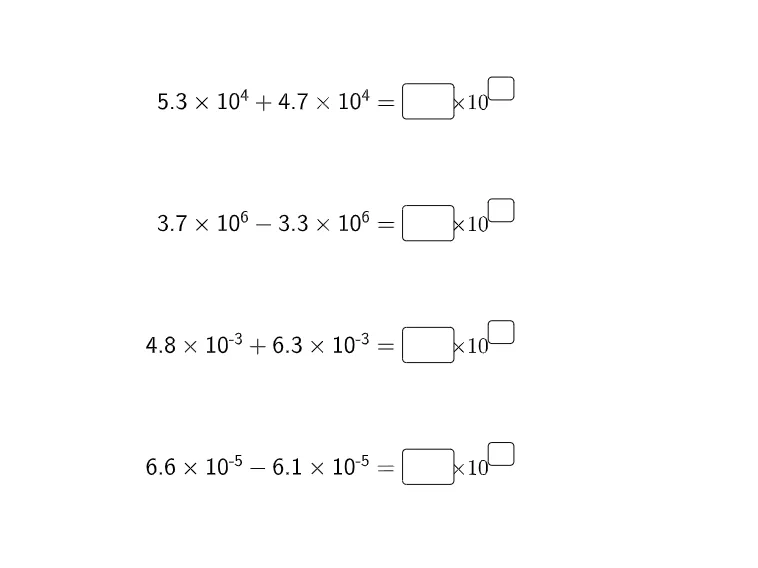
This GeoGebra example is an interactive practice for adding and subtracting numbers in scientific notation. It demonstrates how to perform arithmetic operations on numbers expressed as a coefficient times a power of ten, emphasizing the need to align exponents before combining. The construction uses multiple text fields (InputBox1 through InputBox8) and corresponding text objects (text5 to text8) to present problems and collect student responses. The core mathematical concepts include scientific notation, exponent rules, and operations with powers of ten. This resource is suitable for middle school or early high school students as a classroom exercise or homework assignment to reinforce procedural fluency and conceptual understanding of scientific notation arithmetic.
GeoGebra Commands & Parameters
Textfield() → InputBox1Textfield() → InputBox2Textfield() → InputBox3Textfield() → InputBox4Textfield() → InputBox5Textfield() → InputBox6Textfield() → InputBox7Textfield() → InputBox8
AI Drawing Prompt Reference
Create an interactive practice page for adding and subtracting numbers in scientific notation. Arrange eight input boxes in a neat grid, with a text area below each box to display the problem and feedback. Use a clean worksheet style with a light background, white rectangular input fields, and clear mathematical expressions like '3.2×10^4 + 1.5×10^3'. Organize the layout into two columns, each containing four input boxes and four text areas, aligned vertically with consistent spacing. Keep all elements uniform in size and spacing to create a structured, classroom-like exercise environment.
The prompt above was compiled from the original drawing commands and is for reference only.