
IM 7.2.14 Lesson: Four Representations
Loading the math board and drawing, please wait…
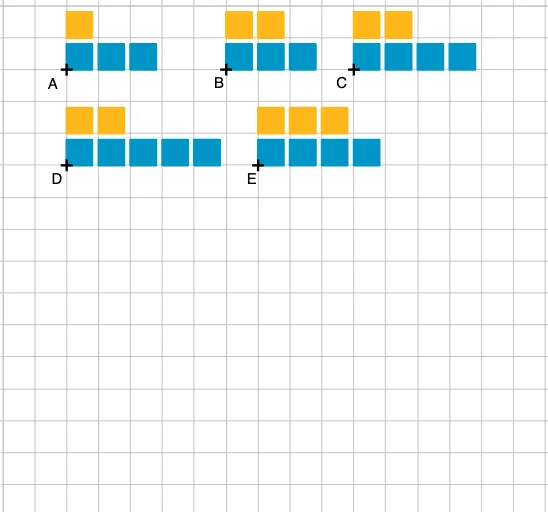
This GeoGebra example is part of the IM 7.2.14 lesson, designed to help students understand four representations of mathematical relationships: graphical, tabular, equation, and contextual. The construction uses the Sequence command to generate a series of squares, with objects such as n, A, r, l1, l2, B, l3, l4, C, D, E, and l5 through l10 to build multiple squares and their side lengths and areas, visually demonstrating the connections between different representations. Core mathematical concepts include properties of squares, sequence generation, equations and algebraic relationships, and the link between geometry and algebra. The key construction steps involve using the Sequence command to create squares in bulk and using lists (l1 to l10) to manage side length and area data, allowing dynamic observation of how parameter changes affect both the shapes and numerical values. This resource is suitable for middle school mathematics (around grade 7), supporting students in developing multi-perspective understanding of mathematical relationships, and can be used for classroom demonstrations or student self-exploration.
GeoGebra Commands & Parameters
Sequence(Polygon[A + (i, 0), A + (i + r, 0), 4], i, 0, n - 1) → l1squares(A + (0, 1), 1, r) → l2squares(B, 3, r) → l3squares(B + (0, 1), 2, r) → l4squares(C, 4, r) → l5squares(C + (0, 1), 2, r) → l6squares(D, 5, r) → l7squares(D + (0, 1), 2, r) → l8squares(E, 4, r) → l9squares(E + (0, 1), 3, r) → l10
AI Drawing Prompt Reference
Create a series of squares with side lengths increasing by 1, starting from a square with a side length of 1, then generating squares with side lengths of 2, 3, 4, and 5. Display the side lengths and areas of each square in a table and show their relationships. Observe how the shape and area values change by adjusting the side length parameter.
The prompt above was compiled from the original drawing commands and is for reference only.