
Identifying Trig Ratios Practice
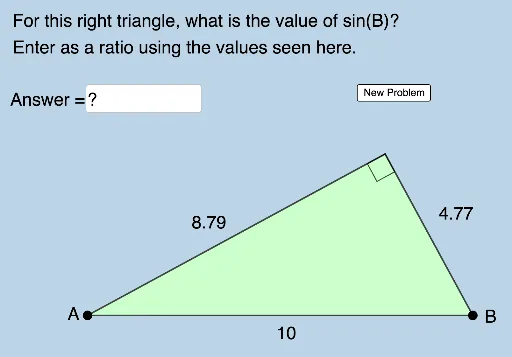
Loading the math board and drawing, please wait…
In collections
Sections 9.4 and 9.5__3 Trig Ratios
This example generates random right triangles to help students quickly identify and understand trigonometric ratios (sine, cosine). It uses GeoGebra commands such as Random, Segment, Semicircle, Rotate, etc., suitable for middle school and above students for self-assessment and learning.
GeoGebra Commands & Parameters
Random(5, 10) → dSegment(B, A) → hSemicircle(A, B) → cRotate(B, (Random[30, 150] * π / 180), Midpoint[A, B]) → B'_2Segment(A, B'_2) → fRandom(30, 150) → aSegment(B'_2, B) → gRandom(1, 6) → nElement(L_1, n) → text1Textfield(b) → InputBox1Polygon(A, B'_2, B) → t1, b_1, a_1, b'_2Angle(A, B'_2, B) → αAngle(B'_2, B, A) → βAngle(B, A, B'_2) → γ
AI Drawing Prompt Reference
Draw a random right triangle with a random hypotenuse and a random acute angle, represent the hypotenuse with a semicircle, rotate one acute angle to an angle between 30° and 150°, label the lengths of the three sides and two legs, and display the measure of one angle.
The prompt above was compiled from the original drawing commands and is for reference only.