
Dynamic Sine and Cosine Illustrator
Loading the math board and drawing, please wait…
In collections
Sections 9.4 and 9.5__3 Trig Ratios
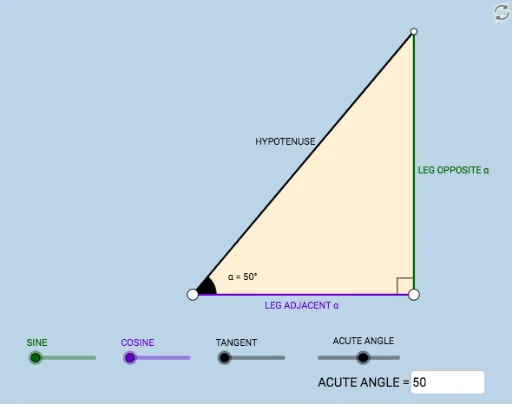
This example demonstrates the dynamic behavior and geometric interpretation of sine and cosine ratios in a right triangle context. It involves core math concepts like trigonometric definitions, side-angle relationships, and dynamic geometry. Construction uses commands such as Segment, OrthogonalLine, Rotate, Angle, Ray, Circle, Intersect, Polygon, and Textfield. Suitable for high school mathematics education to visually connect trigonometric functions with geometric figures.
GeoGebra Commands & Parameters
Segment(A, B) → fOrthogonalLine(B, f) → gRotate(B, (a * π / 180), A) → B'Angle(B, A, B') → αRay(A, B') → hCircle(B, 2) → cIntersect(c, g, 2) → CRay(B, C) → iIntersect(h, i) → DSegment(B, D) → jSegment(A, D) → kPolygon(A, B, D) → poly1, d, a_1, bRotate(B, If[0 < e ≤ 1, (-((e * (π / 2 - α)))), α - π / 2], D) → B'_1Rotate(D, If[0 < e ≤ 1, (-((e * (π / 2 - α)))), α - π / 2], D) → D'Segment(B'_1, D') → j'Rotate(A, If[0 < l ≤ 1, (α * l), α], A) → A'Rotate(B, If[0 < l ≤ 1, (α * l), α], A) → B'_2Segment(A', B'_2) → f'Rotate(B, If[0 < m ≤ 1, (m * π / 2), π / 2], B) → B'_3Rotate(D, If[0 < m ≤ 1, (m * π / 2), π / 2], B) → D'_1Segment(B'_3, D'_1) → j'_1Textfield(a) → InputBox1Angle(D, B, A) → β
AI Drawing Prompt Reference
Draw a right triangle to illustrate the dynamic behavior of sine and cosine. Start with a side, create a perpendicular line, and rotate the side to form an angle. Use a circle and intersection points to determine the triangle's vertices, then draw the corresponding segments. Add text to display angle values and show the dynamic illustration of sine and cosine changing with the angle.
The prompt above was compiled from the original drawing commands and is for reference only.