
Identify Rotated Polygons
Loading the math board and drawing, please wait…
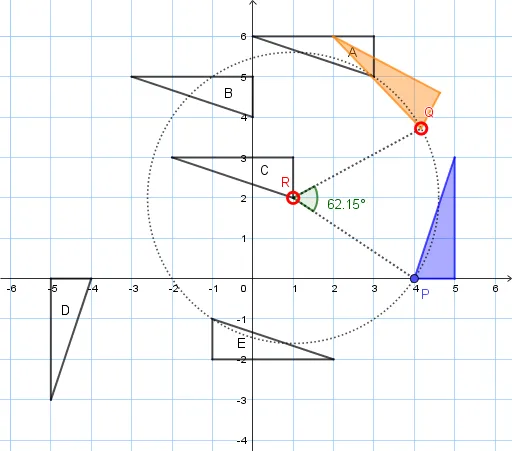
This example demonstrates how to identify and draw rotated polygons using GeoGebra. It involves core mathematical concepts such as polygons, rotation, angles, linear equations, and geometric transformations. Key GeoGebra commands and objects used include Polygon, Rotate, Circle, Point, Angle, and Segment. Suitable for high school mathematics teaching, helping students understand and apply geometric transformations and coordinate geometry concepts.
GeoGebra Commands & Parameters
Polygon(P, B_1, C_1) → t1, c, a, bRotate(P, 90°, D_1) → A'Rotate(B_1, 90°, D_1) → B'Rotate(C_1, 90°, D_1) → C'Polygon(A', B', C') → B, c', a', b'Rotate(P, 90°, E_1) → A'_1Rotate(B_1, 90°, E_1) → B'_1Rotate(C_1, 90°, E_1) → C'_1Polygon(A'_1, B'_1, C'_1) → A, c'_1, a'_1, b'_1Rotate(P, (-(90°)), E_1) → A'_2Rotate(B_1, (-(90°)), E_1) → B'_2Rotate(C_1, (-(90°)), E_1) → C'_2Polygon(A'_2, B'_2, C'_2) → E, c'_2, a'_2, b'_2Rotate(P, 180°, D_1) → A'_3Rotate(B_1, 180°, D_1) → B'_3Rotate(C_1, 180°, D_1) → C'_3Polygon(A'_3, B'_3, C'_3) → D, c'_3, a'_3, b'_3Polygon(E_1, F, G) → C, g, e, fCircle(R, P) → dPoint(d) → QAngle(P, R, Q) → αRotate(P, α, R) → HRotate(B_1, α, R) → IRotate(C_1, α, R) → JPolygon(H, I, J) → t1', j, h, iSegment(R, Q) → kSegment(R, P) → l