
IB HL 3D Geometry Visualization
Loading the math board and drawing, please wait…
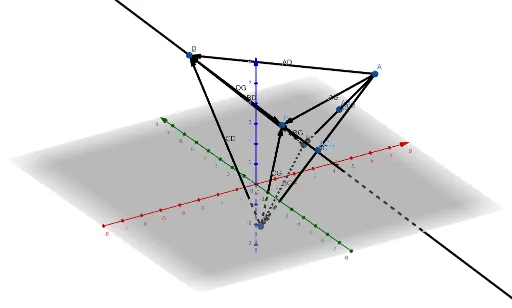
This example visualizes a 3D geometry problem from IB HL Mathematics, demonstrating vector operations, planes, and tetrahedra in a coordinate system. Key math concepts include vector algebra, coordinate geometry, and solid geometry. Constructed using commands like Vector, Line, and Tetrahedron, along with points, lines, and faces. Ideal for IB HL students to enhance spatial reasoning and understanding of 3D problems.
GeoGebra Commands & Parameters
Vector(A, B) → ABVector(A, C) → ACVector(B, C) → BCLine((4, -1, 0), Vector[(-1, 1, 1)]) → LVector(A, D) → ADVector(B, D) → BDVector(C, D) → CDVector(A, G) → AGVector(B, G) → BGVector(C, G) → CGVector(D, G) → DGTetrahedron(A, B, C) → CH_{4}, E, edgeCE, edgeBE, faceABC, faceACE, faceABE, faceBCE, edgeAC, edgeAB, edgeBC, edgeAE
AI Drawing Prompt Reference
Visualize a 3D geometry problem by plotting vectors, planes, and a tetrahedron in a coordinate system. Start by drawing three vectors originating from a common point, then define a line using one of these vectors. Connect this point to three others with vectors to form the edges of a tetrahedron. Finally, highlight all the faces and edges of the tetrahedron to illustrate the relationships between vectors, planes, and solid geometry.
The prompt above was compiled from the original drawing commands and is for reference only.