
Hyperbola - Locus
Loading the math board and drawing, please wait…
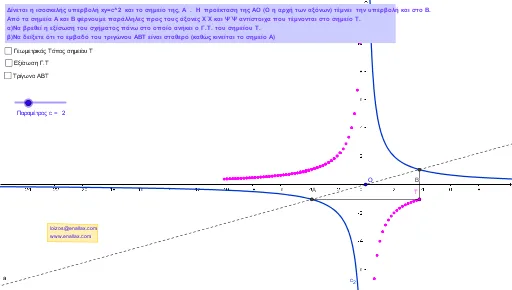
This example demonstrates the geometric properties of a hyperbola. Key mathematical concepts include the definition and geometric properties of a hyperbola, as well as the concept of a locus. Using GeoGebra commands such as Line, Intersect, Segment, and Polygon, the generation process of the hyperbola is dynamically illustrated. Suitable for high school mathematics education and learning.
GeoGebra Commands & Parameters
Line(A, O) → aIntersect(c_2, a, 2) → BLine(A, xAxis) → bLine(B, yAxis) → dIntersect(b, d) → TSegment(T, A) → fSegment(T, B) → gPolygon(T, A, B) → poly1, b_1, c_1, a_1If(h, 1, 0) → speedPolygon(C, D, E, F) → poly2, c_3, d_1, e_1, f_1
AI Drawing Prompt Reference
Draw a hyperbola to demonstrate its geometric properties and the concept of a locus. Start by drawing a horizontal axis and a line passing through the origin. Find the intersection points of this line with the hyperbola. Then, draw lines from these points to the horizontal and vertical axes, locate their intersection. Finally, connect the intersection points to the origin and draw a triangle that includes the origin and the two intersection points to dynamically illustrate the formation of the hyperbola.
The prompt above was compiled from the original drawing commands and is for reference only.