
Huevo: Geometric Construction and Symmetry Exploration
Loading the math board and drawing, please wait…
In collections
geometriadinamica.es
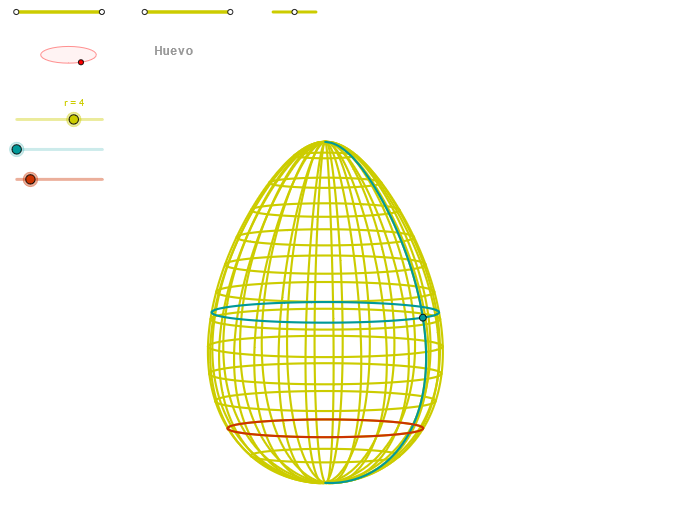
The Huevo example demonstrates how to explore symmetry and standard deviation through geometric constructions. Key mathematical concepts include symmetry, standard deviation, geometric construction, and ellipses. Construction involves using GeoGebra commands such as Segment, Point, OrthogonalLine, Circle, Intersect, Ellipse, etc. Suitable for middle school and above students to learn geometry and statistical foundations.
GeoGebra Commands & Parameters
Segment(Q3, Q4) → p2Point(p2) → P3Segment(P3, Q4) → p4Point(p4) → P4Segment(Q1, Q2) → p1Point(p1) → P1Segment(P1, Q2) → p3Point(p3) → P2OrthogonalLine(C, xAxis) → zz2Circle(C, 0.62) → zz0Intersect(zz0, zz2, 1) → ZZ4Intersect(zz0, zz2, 2) → ZZ3Ellipse(ZZ3, ZZ4, 0.65) → zElipse2Point(zElipse2) → ZIntersect(zElipse2, zz2) → ZZ7, ZZ8Angle(ZZ8, C, Z) → zAngIncOrthogonalLine(C, yAxis) → zz1Intersect(zz0, zz1, 2) → ZZ2Intersect(zz0, zz1, 1) → ZZ1Ellipse(ZZ1, ZZ2, 0.65) → zElipse1Point(zElipse1) → XYIntersect(zElipse1, zz1) → ZZ5, ZZ6Angle(ZZ6, C, XY) → zAngRotSegment(Q5, Q6) → p5Point(p5) → P5Segment(ZZ5, ZZ6) → zz4Segment(ZZ7, ZZ8) → zz3Intersect(zElipse2, zElipse1, 1) → zPunto1Intersect(zElipse2, zElipse1, 4) → zPunto2Segment(zPunto1, zPunto2) → zSeg2CurveCartesian(((2 * r) * ((((0.7 * sqrt(((u * (u - 1.4)) * (u - 1)))) * sin(α)) * sin(zAngRot)) + (((0.7 * sqrt(((u * (u - 1.4)) * (u - 1)))) * cos(α)) * cos(zAngRot)))), ((2 * r) * (((((-0.7 * sqrt(((u * (u - 1.4)) * (u - 1)))) * sin(α)) * cos(zAngRot)) * sin(zAngInc)) + ((((0.7 * sqrt(((u * (u - 1.4)) * (u - 1)))) * cos(α)) * sin(zAngRot)) * sin(zAngInc)) + (u * cos(zAngInc)))) - 3, u, u1, u2) → curva2CurveCartesian(((2 * r) * ((((0.7 * sqrt(((β * (β - 1.4)) * (β - 1)))) * sin(v)) * sin(zAngRot)) + (((0.7 * sqrt(((β * (β - 1.4)) * (β - 1)))) * cos(v)) * cos(zAngRot)))), ((2 * r) * (((((-0.7 * sqrt(((β * (β - 1.4)) * (β - 1)))) * sin(v)) * cos(zAngRot)) * sin(zAngInc)) + ((((0.7 * sqrt(((β * (β - 1.4)) * (β - 1)))) * cos(v)) * sin(zAngRot)) * sin(zAngInc)) + (β * cos(zAngInc)))) - 3, v, v1, v2) → a1CurveCartesian(((2 * r) * ((((0.7 * sqrt(((0.5 * (0.5 - 1.4)) * (0.5 - 1)))) * sin(v)) * sin(zAngRot)) + (((0.7 * sqrt(((0.5 * (0.5 - 1.4)) * (0.5 - 1)))) * cos(v)) * cos(zAngRot)))), ((2 * r) * (((((-0.7 * sqrt(((0.5 * (0.5 - 1.4)) * (0.5 - 1)))) * sin(v)) * cos(zAngRot)) * sin(zAngInc)) + ((((0.7 * sqrt(((0.5 * (0.5 - 1.4)) * (0.5 - 1)))) * cos(v)) * sin(zAngRot)) * sin(zAngInc)) + (0.5 * cos(zAngInc)))) - 3, v, v1, v2) → curva1Sequence(CurveCartesian[((2 * r) * ((((0.7 * sqrt(((u * (u - 1.4)) * (u - 1)))) * sin(v)) * sin(zAngRot)) + (((0.7 * sqrt(((u * (u - 1.4)) * (u - 1)))) * cos(v)) * cos(zAngRot)))), ((2 * r) * (((((-0.7 * sqrt(((u * (u - 1.4)) * (u - 1)))) * sin(v)) * cos(zAngRot)) * sin(zAngInc)) + ((((0.7 * sqrt(((u * (u - 1.4)) * (u - 1)))) * cos(v)) * sin(zAngRot)) * sin(zAngInc)) + (u * cos(zAngInc)))) - 3, u, u1, u2], v, v1, v2, (3 * paso)) → list1Sequence(CurveCartesian[((2 * r) * ((((0.7 * sqrt(((u * (u - 1.4)) * (u - 1)))) * sin(v)) * sin(zAngRot)) + (((0.7 * sqrt(((u * (u - 1.4)) * (u - 1)))) * cos(v)) * cos(zAngRot)))), ((2 * r) * (((((-0.7 * sqrt(((u * (u - 1.4)) * (u - 1)))) * sin(v)) * cos(zAngRot)) * sin(zAngInc)) + ((((0.7 * sqrt(((u * (u - 1.4)) * (u - 1)))) * cos(v)) * sin(zAngRot)) * sin(zAngInc)) + (u * cos(zAngInc)))) - 3, v, v1, v2], u, u1, u2, paso) → list2
AI Drawing Prompt Reference
Draw an egg-shaped outline formed by two intersecting ellipses, one oriented horizontally and one vertically, sharing the same center. At the center, place a small circle and draw horizontal and vertical lines through it, intersecting the circle at four points that serve as the major axis endpoints of the ellipses. On each ellipse, take a moving point and connect it to the intersection of the ellipse with the auxiliary line, creating angle markers. Inside the egg, fill with multiple parametric curves forming a grid-like or rotational surface, symmetric about the center, with angle labels to illustrate symmetry.
The prompt above was compiled from the original drawing commands and is for reference only.