
How Fast Are You Spinning? – Dynamic Model of Linear Speed on Latitude Circles
Loading the math board and drawing, please wait…
In collections
Similarity, Right Triangles, and Trigonometry (SRT) Cluster
GA Chapter 8: Right Triangles and Trigonometry
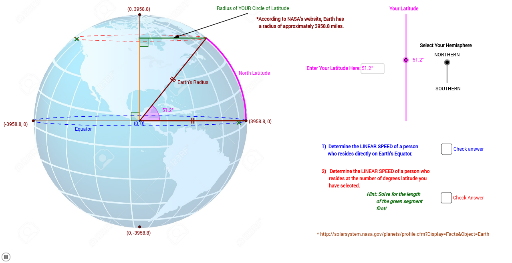
This interactive GeoGebra applet demonstrates how the linear speed of a person on Earth's surface varies with latitude due to the planet's rotation. It visualizes the circle of latitude and dynamically updates the speed as the user adjusts the latitude slider. Core mathematical concepts include circular motion, the relationship between linear speed, angular speed, and radius, and the trigonometric connection between latitude and the radius of the latitude circle. The construction uses GeoGebra commands such as Point, Line, CircleArc, Rotate, Angle, Slider, Textfield, Vector, and Midpoint to build the Earth model, latitude circles, and speed indicators. Suitable for middle school to high school physics or mathematics classes, this applet helps students grasp rotational kinematics and trigonometric applications in a real-world context, and can also be used in geography lessons to explore Earth's rotation effects.
GeoGebra Commands & Parameters
Point(c) → APoint(c) → BPoint(c) → CPoint(c) → DLine(B, D) → hLine(C, A) → bMirror(O, b) → E'Mirror(O, b) → E'_1Mirror(O, b) → E'_2Mirror(R, b) → R'Line(O, A) → nLine(O, B) → qPoint(n) → SSegment(O, A) → rRotate(A, Latitude, O) → A'Angle(A, O, A') → θSegment(O, A') → sCircleArc(O, A, A') → dOrthogonalLine(A', q) → aIntersect(q, a) → ESegment(E, A') → eSegment(E, O) → fAngle(O, E, A') → αMirror(A', q) → A''Mirror(A', n) → A''_1Mirror(A''_1, q) → FPoint(e) → GMirror(G, q) → G'Ellipse(G', G, A') → gIntersect(g, q) → H, IPoint(g) → JSegment(E, A') → iLineBisector(i) → jIntersect(a, j) → KVector(R, K) → uMirror(E, n) → E'_3Mirror(A', n) → A''_2Segment(E'_3, A''_2) → i'Mirror(g, n) → g'Mirror(O, n) → O'Mirror(A', n) → A''_3Segment(O', A''_3) → s'OrthogonalLine(J, n) → lPoint(g') → LPoint(k) → NMidpoint(i') → QVector(R', Q) → vMirror(E, n) → E'_4Mirror(O, n) → O'_1Segment(E'_4, O'_1) → f'Angle(A''_1, E'_3, O) → βMirror(d, n) → d'Angle(s', r) → γAngle(B, O, C) → δAngle(C, O, D) → εSegment(C, A) → a_1Segment(E, B) → b_1Segment(E'_3, D) → c_1Textfield(Latitude) → inputBox1
AI Drawing Prompt Reference
Draw a model of the Earth with the equator and latitude circles at different latitudes. Dynamically show the linear speed of a person on the Earth's surface at different latitudes by adjusting a slider. Start by drawing the center point O of the Earth, then draw the equator line b and a line n perpendicular to the equator. Next, draw latitude circles d at different latitudes and mark the speed indicators on each circle. Finally, use rotation and mirroring operations to dynamically display the changes in linear speed.
The prompt above was compiled from the original drawing commands and is for reference only.