
Horizontal Parabola by steven merwin
Loading the math board and drawing, please wait…
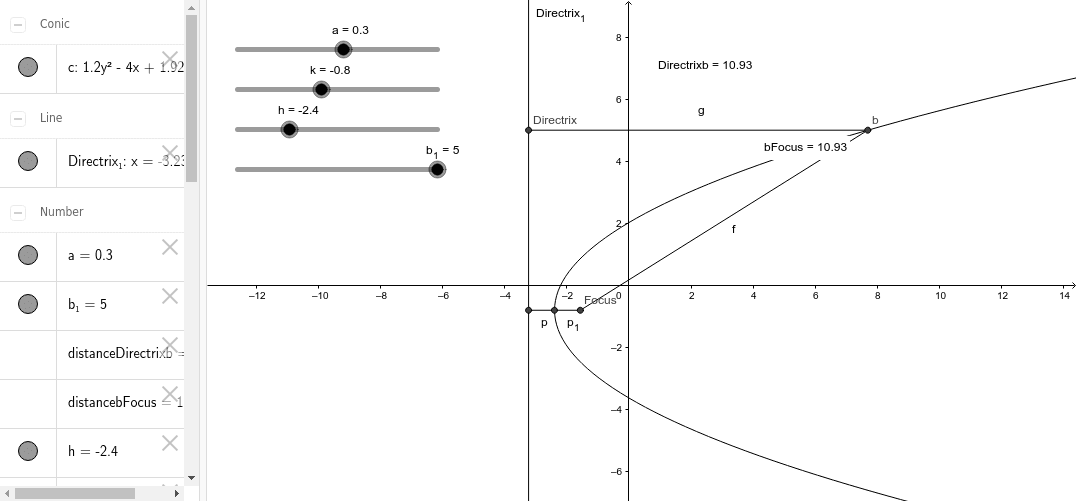
This example demonstrates the geometric construction of a horizontal parabola. It involves the basic properties of parabolas and geometric construction. Using GeoGebra commands such as Segment, Distance, and Midpoint, the focus and directrix of the parabola can be dynamically displayed. Suitable for high school mathematics education and learning.
GeoGebra Commands & Parameters
Segment(B, A) → pSegment(A, Focus) → p_1Segment(Focus, b) → fSegment(b, Directrix) → gDistance(Directrix, b) → distanceDirectrixbMidpoint(Directrix, b) →Distance(b, Focus) → distancebFocusMidpoint(b, Focus) →
AI Drawing Prompt Reference
Draw a horizontal parabola, showing the geometric construction of its focus and directrix. First, draw the focus and directrix, then connect the focus to a point on the directrix. Find the midpoint between the focus and the point on the directrix. Next, draw a line segment from the focus to the point on the directrix and find the midpoint of this segment. Finally, connect the focus to the point on the directrix and draw a line segment representing the distance from the focus to the point on the directrix, completing the dynamic display of the parabola.
The prompt above was compiled from the original drawing commands and is for reference only.