
Histogram Exercise
Loading the math board and drawing, please wait…
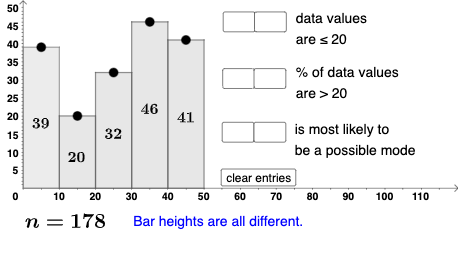
This example demonstrates how to use histograms to display data distribution. Key mathematical concepts include data statistics, frequency distribution, and histogram construction. Using GeoGebra commands such as IndexOf, Polygon, and Textfield, users can dynamically adjust the histogram's shape and data. Suitable for middle school and above students for learning data statistics and probability statistics.
GeoGebra Commands & Parameters
IndexOf(Max[l2], l2) → b_2Polygon((0, 0), (10, 0), (10, y(A)), (0, y(A))) → q1, i, m, n, pPolygon((10, 0), (20, 0), (20, y(B)), (10, y(B))) → q2, q, r, s, tPolygon((20, 0), (30, 0), (30, y(C)), (20, y(C))) → q3, f_1, g_1, h_1, i_1Polygon((30, 0), (40, 0), (40, y(D)), (30, y(D))) → q4, j_1, k_1, l_1, m_1Polygon((40, 0), (50, 0), (50, y(E)), (40, y(E))) → q5, n_1, p_1, q_1, r_1Textfield(b_1) → InputBox1Textfield(c_1) → InputBox2Textfield(d_1) → InputBox3Textfield(e_1) → InputBox4Textfield(o_1) → InputBox5Textfield(s_1) → InputBox6Textfield(t_1) → InputBox7Textfield(u_1) → InputBox8Mode(l2) → l3Max(l2) → a_2CountIf(x ≟ Max[l2], l2) → w_1If(Length[l3] ≟ 0, "Bar heights are all different.", "Some bar heights are the same.") → text10If(cc1, "√", "X") → text11If(cc2, "√", "X") → text12If(cc3 ≟ true, "√", "X") → text13If(Length[Mode[l4]] ≟ 0, "No digits repeat!", "Some digits repeat.") → text14CountIf(x ≟ Max[l2], l2) → d_2IndexOf(Max[l2], l2, b_2 + 1) → b_3IndexOf(Max[l2], l2, b_3 + 1) → b_4IndexOf(Max[l2], l2, b_4 + 1) → b_5IndexOf(Max[l2], l2, b_5 + 1) → b_6
AI Drawing Prompt Reference
Draw a histogram in the coordinate plane made of five adjacent rectangular bars. Use the x-axis as the common baseline, and construct bars over the intervals 0–10, 10–20, 20–30, 30–40, and 40–50. Each bar should be closed as a polygon from its interval endpoints up to a user-controlled top height, so the bar shapes reflect the entered data distribution. Place several editable input fields on the figure to enter the parameters controlling the bar heights. Include a text area that displays a short message comparing the entered values (such as whether some heights repeat or not), driven by the same inputs.
The prompt above was compiled from the original drawing commands and is for reference only.