
Hexagonal Tile Pattern
Loading the math board and drawing, please wait…
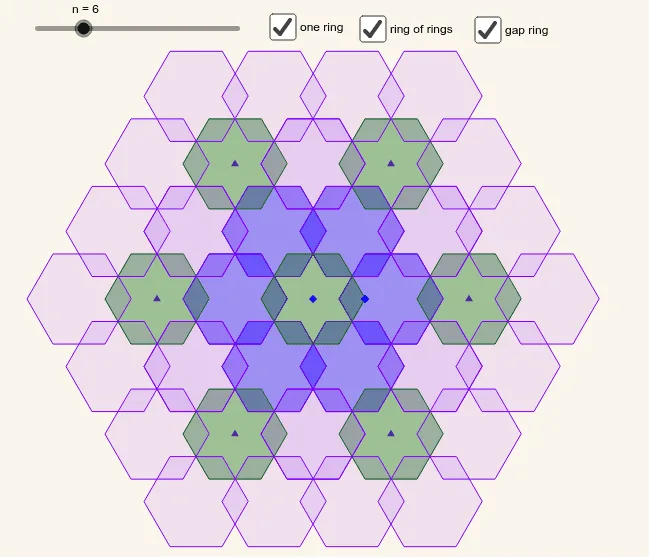
This example demonstrates a pattern inspired by a hexagonal floor tile. It involves concepts of polygons and angles. Using GeoGebra commands such as Sequence and Polygon, a series of polygons can be constructed. Suitable for middle school and above students to learn about polygons and angles.
GeoGebra Commands & Parameters
Sequence(Rotate[B, ((i * 360) * ° / n), A], i, 1, n) → list1Polygon(list1) → poly1, , , , , ,Sequence(Midpoint[Element[list1, i], Element[list1, f(i + 1)]], i, 1, n) → list2Sequence(Midpoint[Element[list2, i], Element[list2, f(i + 1)]], i, 1, n) → list3Sequence(Translate[poly1, Vector[(2 * Vector[A, Element[list3, i]])]], i, 1, n) → list4Sequence(Translate[A, Vector[(4 * Vector[A, Element[list3, i]])]], i, 1, n) → list5Sequence(Translate[B, Vector[(4 * Vector[A, Element[list3, i]])]], i, 1, n) → list6Sequence(Translate[poly1, Vector[(4 * Vector[A, Element[list3, i]])]], i, 1, n) → list8Sequence(PolyRing[Element[list5, i], Element[list6, i], n], i, 1, n) → list7
AI Drawing Prompt Reference
Create a hexagonal tile pattern by first creating a central point A and a hexagon B, then rotate hexagon B around point A to form a series of hexagons. Find the midpoints of these hexagons, then find the midpoints of the new midpoints. Finally, translate the original hexagon and repeatedly translate and rotate it around points A and B to generate the hexagonal tile pattern.
The prompt above was compiled from the original drawing commands and is for reference only.