
Hexagonal Prism: 3D Construction and Visualization
Loading the math board and drawing, please wait…
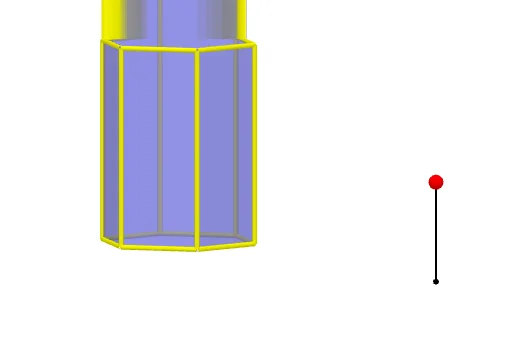
① This example demonstrates a regular hexagonal prism in 3D space, showing its base, lateral faces, and edges interactively in GeoGebra's 3D view. ② Core mathematical concepts include solid geometry definitions of prisms, regular hexagonal bases, congruent parallel lateral faces, and relationships among vertices, edges, and faces; it also involves properties of equilateral and isosceles triangles since a regular hexagon decomposes into six equilateral triangles. ③ Construction highlights: from the summary, the Polygon command creates the hexagonal base poly1, Prism generates the solid, Segment draws edges, Point defines vertices, and Rotate/Mirror are used for symmetry or rotational duplication. Objects include vertices A, B, C, D, E, F, lateral faces like faceBCHG and faceCDIH, and edges like edgeBG and edgeGH, illustrating a complete workflow from 2D polygon to 3D prism. ④ Suitable for middle/high school geometry lessons, introductory solid geometry, and university-level engineering graphics or computer graphics demonstrations, also useful for exploring volume, surface area, or cross-sections of prisms.
GeoGebra Commands & Parameters
Polygon(A, B, 6, xOyPlane) → poly1, a, F, b, c, d, e, f, C, D, EPrism(poly1, A + (0, 0, 4)) → g, G, faceEFKJ, face2, face3, edge1, edgeBG, edgeCH, edgeDI, edgeEJ, edgeFK, edge2, H, edgeGH, edgeHI, edgeIJ, edgeJK, edge3, I, J, K, face1, faceBCHG, faceCDIH, faceDEJISegment(M, M + (0, 0, 2)) → hPoint(h) → NRotate(Polygon[E, D, I, J], (90° * t), Segment[D, E]) → poly2Rotate(Polygon[G, H, I, J, K, L], (90° * t), Segment[I, J]) → poly3Rotate(poly3, (90° * t), Segment[D, E]) → poly3'Rotate(Polygon[C, D, I, H], (60° * t), Segment[D, I]) → poly4Rotate(poly4, (90° * t), Segment[D, E]) → poly4'Mirror(poly4, OrthogonalPlane[Midpoint[D, E], Segment[D, E]]) → poly4'_1Rotate(poly4'_1, (90° * t), Segment[D, E]) → poly5Rotate(C, (60° * t), Segment[D, I]) → C'Mirror(Polygon[D, E, J, I], OrthogonalPlane[Midpoint[D, C'], Segment[D, C']]) → poly6Mirror(poly6, OrthogonalPlane[Midpoint[D, E], Segment[D, E]]) → poly6'Rotate(poly6, (90° * t), Segment[D, E]) → poly6'_1Rotate(poly6', (90° * t), Segment[D, E]) → poly6''Mirror(E, OrthogonalPlane[Midpoint[D, C'], Segment[D, C']]) → E'Mirror(poly4, OrthogonalPlane[Midpoint[E', C'], Segment[E', C']]) → poly4'_2Rotate(poly4'_2, (90° * t), Segment[D, E]) → poly7Rotate(poly3, (90° * t), Segment[D, E]) → poly3'_1Polygon(A, B, 6, xOyPlane) → poly8, i, R, j, k, l, m, n, O, P, QRotate(poly6', (90° * t), Segment[D, E]) → poly6''_1Rotate(poly4'_1, (90° * t), Segment[D, E]) → poly9Rotate(Polygon[E, D, I, J], (90° * t), Segment[D, E]) → poly10Rotate(poly4, (90° * t), Segment[D, E]) → poly4'_3Rotate(poly6, (90° * t), Segment[D, E]) → poly6'_2Rotate(poly4'_2, (90° * t), Segment[D, E]) → poly11